Wireless Bluetooth Mechanical Keyboard, Velocifire M2 61 is available in Saudi Arabia.
Find out all you need to know about Wireless Bluetooth Mechanical Keyboard, Velocifire M2 61 before buying : Price, Test video, Datasheet, Similar products.
Wireless Bluetooth Mechanical Keyboard, Velocifire M2 61 – Features & Prices in Saudi Arabia :
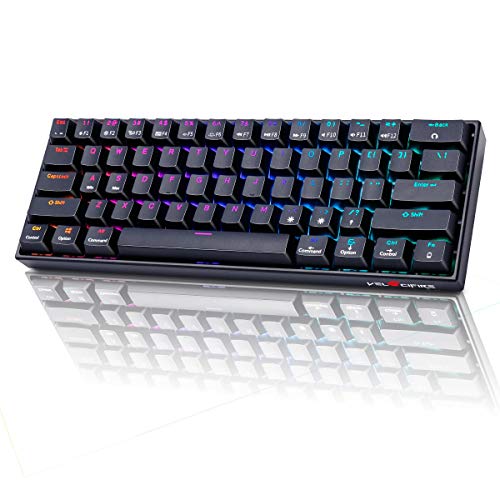
Wireless Bluetooth Mechanical Keyboard, Velocifire M2 61 Keys Mini 60% Mechanical Gaming Keyboard, RGB Backlit Hot Swappable Gateron Brown Switch Black Keyboard
Product Dimensions
13 x 5.5 x 2 inches
Item Weight
1.5 pounds
Manufacturer
VELOCIFIRE
ASIN
B08LDG4JJ2
Country of Origin
China
Item model number
TKL61WS M2
Batteries
1 Lithium Ion batteries required.
Date First Available
October 19, 2020
Test video – Wireless Bluetooth Mechanical Keyboard, Velocifire M2 61 :
Product highlights :
Bluetooth and USB Wired Connection: With Bluetooth and USB wired 2 kind modes connection, this is a wireless gaming keyboard that no longer limits how you can connect. What’s more, in Bluetooth mode, you can connect up to 3 devices. Compatible with Windows/ MacOS.
61 Keys Compact Design: The Mini 60% Mechanical Keyboard can meet your demands in Office or Home and it is Space-saving and Portable, you will be satisfied with how much space you save.
Hot-swapped Gateron Switch: The TKL61WS Bluetooth keyboard features Hot-swapped Gateron Switches which do not require you to solder/desolder switches. Since any brand switch (3 pin switch )is compatible, you can experience different switches without buying a new keyboard.
RGB Backlit: This 60% Custom Mechanical Keyboard has 17 RGB Backlight Modes. These light modes can provide you with a cool gaming experience at night.
Long Battery Life: Velocifire 60% mechanical gaming keyboard built-in a 1800mAh large battery to ensure you a long battery life so that you can take it on your trip or use it for a long meeting.
➕ What is the price of Wireless Bluetooth Mechanical Keyboard, Velocifire M2 61 in Saudi Arabia ?
The price of Wireless Bluetooth Mechanical Keyboard, Velocifire M2 61 in-store is 100 SAR VAT.
➕ When Wireless Bluetooth Mechanical Keyboard, Velocifire M2 61 was released ?
The release date was October 19, 2020.
➕ What is the price of Wireless Bluetooth Mechanical Keyboard, Velocifire M2 61 cheap used ?
The price of Wireless Bluetooth Mechanical Keyboard, Velocifire M2 61 used is 70 SAR VAT.
➕ What are the main characteristics of Wireless Bluetooth Mechanical Keyboard, Velocifire M2 61 ?
Special specifications :
Bluetooth and USB Wired Connection: With Bluetooth and USB wired 2 kind modes connection, this is a wireless gaming keyboard that no longer limits how you can connect. What’s more, in Bluetooth mode, you can connect up to 3 devices. Compatible with Windows/ MacOS.
➕ Is it interesting to buy this product ?
The best people who can answer you are customers who have already bought and tested this product (See Customer Reviews). This product is rated 4.2 / 5 on Amazon.
➕ Where to buy Wireless Bluetooth Mechanical Keyboard, Velocifire M2 61 in Saudi Arabia ?
Check the duration of the warranty and also the faults and defects it covers. Is it complete or limited? and What is included in the warranty (parts, repairs or both)?
Shipping :
Is delivery offered? And how long does it take to get delivered (Delivery time)
Proof of purchase :
Does the shop give you an invoice ?
After-sales service :
Do they have an after-sales service to have information about the installation or operation (instructions for use). Also in case of problem, it is the seller who takes charge or you must contact the manufacturer or supplier yourself.
_____________________________
16 reviews for Wireless Bluetooth Mechanical Keyboard, Velocifire M2 61
Rated 5 out of 5
C. P (verified owner)–
Amazing compact mechanical keyboard with multiple connection options – Exactly what I was looking for! Having read reviews of the ultra-expensive Freewrite and later model Traveler with lustful envy, I decided that the best part of that product was the portability of the mechanical keyboard. So I set out to find a compact bluetooth keyboard to use on-the-go with my 10 inch Fire tablet for creative writing. I already have a couple membrane-type bluetooth keyboards but what fun is that…? My daily keyboard (with Windows 10 desktop) is a VELOCIFIRE TKL02WS 87 Key Tenkeyless, and I love the feel and not-too-loud clickety sound and the fact that I can use it wired (USB-C) or wireless with USB dongle. Imagine my delight to find that Velocifire makes a bluetooth 60% keyboard!
Rated 3 out of 5
E. E (verified owner)–
Warning: Hot Swap and Windows – Let me start off this by saying that is looooved this keyboard and was super happy with it until I found out 2 critical flaws.
Rated 5 out of 5
C. P (verified owner)–
Amazing compact mechanical keyboard with multiple connection options – Exactly what I was looking for! Having read reviews of the ultra-expensive Freewrite and later model Traveler with lustful envy, I decided that the best part of that product was the portability of the mechanical keyboard. So I set out to find a compact bluetooth keyboard to use on-the-go with my 10 inch Fire tablet for creative writing. I already have a couple membrane-type bluetooth keyboards but what fun is that…? My daily keyboard (with Windows 10 desktop) is a VELOCIFIRE TKL02WS 87 Key Tenkeyless, and I love the feel and not-too-loud clickety sound and the fact that I can use it wired (USB-C) or wireless with USB dongle. Imagine my delight to find that Velocifire makes a bluetooth 60% keyboard!
Rated 5 out of 5
K. N (verified owner)–
Its not that bad – The keyboard and clickiness are good. But one thing they don’t tell you is that you can connect the keyboard with the cable it comes with.
Rated 4 out of 5
A. B (verified owner)–
– Good keyboard a little confusing setup and getting used to shortcuts such as printscrn is a little confusing but satisfied overall
Rated 5 out of 5
K. K (verified owner)–
It does what it’s supposed to do – It works great on my mini computer
Rated 5 out of 5
F. D (verified owner)–
Great keyboard – Nice feel, perfect for the steam deck that’s why I got it. Love the RGB
Rated 5 out of 5
K. K (verified owner)–
It does what it’s supposed to do – It works great on my mini computer
Rated 5 out of 5
K. N (verified owner)–
Its not that bad – The keyboard and clickiness are good. But one thing they don’t tell you is that you can connect the keyboard with the cable it comes with.
Rated 3 out of 5
G. Z (verified owner)–
very nifty keyboard, but not for programmers – This is a very nifty keyboard and a very nifty price. It has a lot of customization options, including lighting modes, macros. I am a programmer and needed a keyboard to take into the office occasionally. This was almost perfect out of the box except for one subtle but extremely important thing. Because it have fewer keys, some pull double or triple duty. The / key in particular was a problem because I use it a lot in file paths and it took two keys to type it – this is almost a deal killer for me. But I found out there is a key customization app you can get from their website. I was able to make that ?+/+up key work well enough.
Rated 4 out of 5
A. B (verified owner)–
– Good keyboard a little confusing setup and getting used to shortcuts such as printscrn is a little confusing but satisfied overall
Rated 5 out of 5
N. J (verified owner)–
best wireless keyboard for 30 dollars. – probably the best keyboard ive bought yet. the gateron reds are amazing and the stabilizers are immaculate. i love this board!
Rated 3 out of 5
E. E (verified owner)–
Warning: Hot Swap and Windows – Let me start off this by saying that is looooved this keyboard and was super happy with it until I found out 2 critical flaws.
Rated 5 out of 5
F. D (verified owner)–
Great keyboard – Nice feel, perfect for the steam deck that’s why I got it. Love the RGB
Rated 5 out of 5
N. J (verified owner)–
best wireless keyboard for 30 dollars. – probably the best keyboard ive bought yet. the gateron reds are amazing and the stabilizers are immaculate. i love this board!
Rated 3 out of 5
G. Z (verified owner)–
very nifty keyboard, but not for programmers – This is a very nifty keyboard and a very nifty price. It has a lot of customization options, including lighting modes, macros. I am a programmer and needed a keyboard to take into the office occasionally. This was almost perfect out of the box except for one subtle but extremely important thing. Because it have fewer keys, some pull double or triple duty. The / key in particular was a problem because I use it a lot in file paths and it took two keys to type it – this is almost a deal killer for me. But I found out there is a key customization app you can get from their website. I was able to make that ?+/+up key work well enough.


C. P (verified owner) –
Amazing compact mechanical keyboard with multiple connection options – Exactly what I was looking for! Having read reviews of the ultra-expensive Freewrite and later model Traveler with lustful envy, I decided that the best part of that product was the portability of the mechanical keyboard. So I set out to find a compact bluetooth keyboard to use on-the-go with my 10 inch Fire tablet for creative writing. I already have a couple membrane-type bluetooth keyboards but what fun is that…? My daily keyboard (with Windows 10 desktop) is a VELOCIFIRE TKL02WS 87 Key Tenkeyless, and I love the feel and not-too-loud clickety sound and the fact that I can use it wired (USB-C) or wireless with USB dongle. Imagine my delight to find that Velocifire makes a bluetooth 60% keyboard!
E. E (verified owner) –
Warning: Hot Swap and Windows – Let me start off this by saying that is looooved this keyboard and was super happy with it until I found out 2 critical flaws.
C. P (verified owner) –
Amazing compact mechanical keyboard with multiple connection options – Exactly what I was looking for! Having read reviews of the ultra-expensive Freewrite and later model Traveler with lustful envy, I decided that the best part of that product was the portability of the mechanical keyboard. So I set out to find a compact bluetooth keyboard to use on-the-go with my 10 inch Fire tablet for creative writing. I already have a couple membrane-type bluetooth keyboards but what fun is that…? My daily keyboard (with Windows 10 desktop) is a VELOCIFIRE TKL02WS 87 Key Tenkeyless, and I love the feel and not-too-loud clickety sound and the fact that I can use it wired (USB-C) or wireless with USB dongle. Imagine my delight to find that Velocifire makes a bluetooth 60% keyboard!
K. N (verified owner) –
Its not that bad – The keyboard and clickiness are good. But one thing they don’t tell you is that you can connect the keyboard with the cable it comes with.
A. B (verified owner) –
– Good keyboard a little confusing setup and getting used to shortcuts such as printscrn is a little confusing but satisfied overall
K. K (verified owner) –
It does what it’s supposed to do – It works great on my mini computer
F. D (verified owner) –
Great keyboard – Nice feel, perfect for the steam deck that’s why I got it. Love the RGB
K. K (verified owner) –
It does what it’s supposed to do – It works great on my mini computer
K. N (verified owner) –
Its not that bad – The keyboard and clickiness are good. But one thing they don’t tell you is that you can connect the keyboard with the cable it comes with.
G. Z (verified owner) –
very nifty keyboard, but not for programmers – This is a very nifty keyboard and a very nifty price. It has a lot of customization options, including lighting modes, macros. I am a programmer and needed a keyboard to take into the office occasionally. This was almost perfect out of the box except for one subtle but extremely important thing. Because it have fewer keys, some pull double or triple duty. The / key in particular was a problem because I use it a lot in file paths and it took two keys to type it – this is almost a deal killer for me. But I found out there is a key customization app you can get from their website. I was able to make that ?+/+up key work well enough.
A. B (verified owner) –
– Good keyboard a little confusing setup and getting used to shortcuts such as printscrn is a little confusing but satisfied overall
N. J (verified owner) –
best wireless keyboard for 30 dollars. – probably the best keyboard ive bought yet. the gateron reds are amazing and the stabilizers are immaculate. i love this board!
E. E (verified owner) –
Warning: Hot Swap and Windows – Let me start off this by saying that is looooved this keyboard and was super happy with it until I found out 2 critical flaws.
F. D (verified owner) –
Great keyboard – Nice feel, perfect for the steam deck that’s why I got it. Love the RGB
N. J (verified owner) –
best wireless keyboard for 30 dollars. – probably the best keyboard ive bought yet. the gateron reds are amazing and the stabilizers are immaculate. i love this board!
G. Z (verified owner) –
very nifty keyboard, but not for programmers – This is a very nifty keyboard and a very nifty price. It has a lot of customization options, including lighting modes, macros. I am a programmer and needed a keyboard to take into the office occasionally. This was almost perfect out of the box except for one subtle but extremely important thing. Because it have fewer keys, some pull double or triple duty. The / key in particular was a problem because I use it a lot in file paths and it took two keys to type it – this is almost a deal killer for me. But I found out there is a key customization app you can get from their website. I was able to make that ?+/+up key work well enough.