
Description
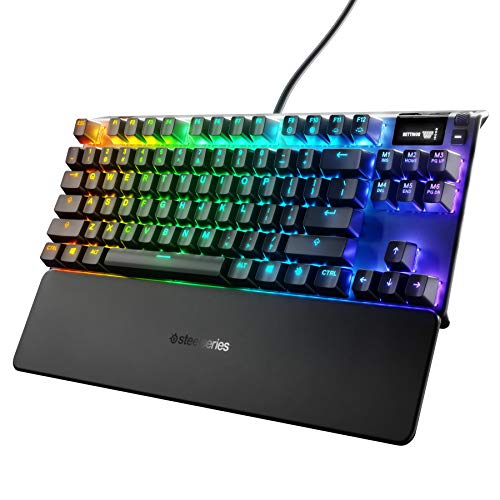
SteelSeries Apex 7 TKL Compact Mechanical Gaming – Features & Prices in Saudi Arabia :
SteelSeries Apex 7 TKL Compact Mechanical Gaming Keyboard – OLED Smart Display – USB Passthrough and Media Controls – Linear and Quiet – RGB Backlit (Red Switch)
Standing screen display size
7 Inches
Item model number
64646
Hardware Platform
PC
Operating System
Windows and Mac OS X. USB port required
Item Weight
1.7 pounds
Product Dimensions
5.48 x 13.99 x 1.6 inches
Item Dimensions LxWxH
5.48 x 13.99 x 1.6 inches
Color
Red – Linear & Quiet
Manufacturer
SteelSeries
ASIN
B07TGQ7CNF
Country of Origin
China
Is Discontinued By Manufacturer
No
Date First Available
June 20, 2019
Test video – SteelSeries Apex 7 TKL Compact Mechanical Gaming :
Product highlights :
Questions & Answers – SteelSeries Apex 7 TKL Compact Mechanical Gaming :
Technical specifications – SteelSeries Apex 7 TKL Compact Mechanical Gaming :
Brand
SteelSeries
Compatible Devices
Gaming Console
Connectivity Technology
USB Cable/ Wired
Keyboard Description
Gaming
Special Feature
Lighting
Color
Red – Linear & Quiet
Operating System
Windows and Mac OS X. USB port required
Number of Keys
104
Keyboard backlighting color support
RGB
Style
Red – Linear & Quiet
Purchase advice :
-
Warranty :
Check the duration of the warranty and also the faults and defects it covers. Is it complete or limited? and What is included in the warranty (parts, repairs or both)?
-
Shipping :
Is delivery offered? And how long does it take to get delivered (Delivery time)
-
Proof of purchase :
Does the shop give you an invoice ?
-
After-sales service :
Do they have an after-sales service to have information about the installation or operation (instructions for use). Also in case of problem, it is the seller who takes charge or you must contact the manufacturer or supplier yourself.
_____________________________
G. B (verified owner) –
The Led lights move when you type and it feels great as a mechanical keyboard – This mechanical keyboard is the best I’ve had and the LED lights are a great touch. It’s not quiet, but it’s quieter than the standard keyboard when you have the brown switches. Has a really nice feel to it and a cool little rolling digital display.
J. D (verified owner) –
no USB hub allowed – This keyboard is great if you use it properly, you cannot use the Keyboard part of the cable through a USB hub. the keyboard will not function… at all… if you plug in the keyboard through a USB hub it will not work. you may plug in the USB PASSTHROUGH through a USB hub but that’s it. if you absolutely need to use it though a hub you need to have another keyboard to get into your computer with. the keys will not work until you log in to the pc and let every driver load in and then “update the keyboard firmware” in the software. (steelseriesengine3) the keyboard will flash until that is done. if you plug in the keyboard directly to your pc everything will work fine 100% of the time. other than that, the lights look absolutely insane (good) the switches are fine (SteelSeries browns) but the only problem I have with them is that when you press one down you will feel the slight tactile bump but then you will need to press the key like 1/100000000000 of an inch more to get it to actuate. if you pretty much only ever type you wont REALLY feel a difference and if this is your first Mechanical keyboard you definitely won’t feel a difference but when your gaming and you don’t press the keys down all the way 80% of the time you’ll sometimes feel it. its not tooo big of a deal though. but if you absolutely couldn’t deal with that you could I guess swap the switches out (I think their hot swappable but I could be wrong) and maybe even treat your self to some holy panda’s or something along those lines.
O. G (verified owner) –
2.5 Years so far and still kicking – Got this back in 2019 and if I told you the amount of abuse this has been through, you’d be shocked to see that this beast is still in nice shape. Sturdy is definitely the word I’d use to describe the build quality, the case seems to be a hard plastic but isn’t a cheap type of feel. This keyboard has some weight to it to let you know it isn’t playing around. I can’t think of how many times I raged and with my fist raised all the way up to the sky, punched down as hard as I could over and over until my hand hurt, keyboard still intact. RGB works great and the software lets you change the effect and color of each individual key if needed. Has buttons to change brightness of the LEDs from the keyboard itself. Favorite part of the keyboard is the media keys, a scroll wheel that lets you turn the volume up or down as well as mute and another button beside it to completely pause whatever is playing. A little extra is the screen in the corner where you can display pretty much anything you want and I think certain games have popups available to display stats if you’re into that. For a non custom generic gaming keyboard out of all the top brands like ASUS and CORSAIR, steelseries definitely should be up there for a keyboard that does what it needs to, looks great and is built to last for years (and take abuse… Apex did it I swear).
J. D (verified owner) –
no USB hub allowed – This keyboard is great if you use it properly, you cannot use the Keyboard part of the cable through a USB hub. the keyboard will not function… at all… if you plug in the keyboard through a USB hub it will not work. you may plug in the USB PASSTHROUGH through a USB hub but that’s it. if you absolutely need to use it though a hub you need to have another keyboard to get into your computer with. the keys will not work until you log in to the pc and let every driver load in and then “update the keyboard firmware” in the software. (steelseriesengine3) the keyboard will flash until that is done. if you plug in the keyboard directly to your pc everything will work fine 100% of the time. other than that, the lights look absolutely insane (good) the switches are fine (SteelSeries browns) but the only problem I have with them is that when you press one down you will feel the slight tactile bump but then you will need to press the key like 1/100000000000 of an inch more to get it to actuate. if you pretty much only ever type you wont REALLY feel a difference and if this is your first Mechanical keyboard you definitely won’t feel a difference but when your gaming and you don’t press the keys down all the way 80% of the time you’ll sometimes feel it. its not tooo big of a deal though. but if you absolutely couldn’t deal with that you could I guess swap the switches out (I think their hot swappable but I could be wrong) and maybe even treat your self to some holy panda’s or something along those lines.
O. G (verified owner) –
2.5 Years so far and still kicking – Got this back in 2019 and if I told you the amount of abuse this has been through, you’d be shocked to see that this beast is still in nice shape. Sturdy is definitely the word I’d use to describe the build quality, the case seems to be a hard plastic but isn’t a cheap type of feel. This keyboard has some weight to it to let you know it isn’t playing around. I can’t think of how many times I raged and with my fist raised all the way up to the sky, punched down as hard as I could over and over until my hand hurt, keyboard still intact. RGB works great and the software lets you change the effect and color of each individual key if needed. Has buttons to change brightness of the LEDs from the keyboard itself. Favorite part of the keyboard is the media keys, a scroll wheel that lets you turn the volume up or down as well as mute and another button beside it to completely pause whatever is playing. A little extra is the screen in the corner where you can display pretty much anything you want and I think certain games have popups available to display stats if you’re into that. For a non custom generic gaming keyboard out of all the top brands like ASUS and CORSAIR, steelseries definitely should be up there for a keyboard that does what it needs to, looks great and is built to last for years (and take abuse… Apex did it I swear).
C. D (verified owner) –
RETURNED – When the description states: “Tactile and Clicky” keys, “blue switch” I kind of expect that. The keys were very smooth however; they were very quite as well. If you depressed the keys enough the keycap would contact the top of the keyboard case and make a “Click” like sound. It was not coming from the key switches but the physical contact of keycap to face plate. The OCD screen is neat, even it not used much. The RGB was very good and easy to set up. I expected a little more from Steel Series high end. Did not get it, so the keyboard was returned. I end up getting a ROOCAT VALCUN 121 that is truly amazing.
C. D (verified owner) –
RETURNED – When the description states: “Tactile and Clicky” keys, “blue switch” I kind of expect that. The keys were very smooth however; they were very quite as well. If you depressed the keys enough the keycap would contact the top of the keyboard case and make a “Click” like sound. It was not coming from the key switches but the physical contact of keycap to face plate. The OCD screen is neat, even it not used much. The RGB was very good and easy to set up. I expected a little more from Steel Series high end. Did not get it, so the keyboard was returned. I end up getting a ROOCAT VALCUN 121 that is truly amazing.
T. P (verified owner) –
Good Keyboard – Amazing out the box.
O. E (verified owner) –
Great Keyboard with Cool Features – I have owned a Steelseries keyboard in the past and was greatly disappointed with the switches it used. I had a m750 with the qx2 switches, and they just felt off to me. Not really sure how to explain, but they just felt off. Im not generally a fan of linear switches ( as a gamer, blasphemy I know) as I tend to have a heavy hand and accidentally hold shift or ctrl by accident, which messes up my movement and gets me killed. Not only that but I feel I mess up more when typing essays for college and have to go back to revise more frequently. I needed a new keyboard that would allow more space for my mouse, as I play on a low dpi, and was looking at TKL models from various companies. Originally I was planning on the G Pro from Logitech to go with my G Pro Wireless, but then I realized they had Romer-G switches. I tested them out and found them alright, but lack of customization and after market keycaps was a turn off for me. The new Apex Pro TKL came out with their OmniPoint switches, which are linear switches that you could change the actuation point of to fit your preference. Again, I am not a fan of linear, so this disappointed me as the rest of the keyboard caught my attention. Luckily with the Apex 7 they allow you to choose your switches out of the 3 options they provide. I chose the browns as I wanted something fast but with some feedback. When it arrived 2 days later, I was impressed with the size and beauty of it. The nicest keyboard I owned so far. The switches feel nice, and there are a few features you won’t find on a some other TKL keyboards like the OLED display (mostly a gimmick but cool nonetheless), usb passthrough, cable routing, and dial. The magnetic wrist rest isn’t plush, more like a flat rubber surface to prop up your hand. That isn’t to say it’s not comfortable or soft, but it is a pain to clean as it is a dust magnet. They keycaps feel cheap and are my main gripe for a premium keyboard, however I Luckily had higher quality shine-through keycaps from previously. Overall I am satisfied with the keyboard and would recommend to anyone thinking of purchasing.
G. B (verified owner) –
The Led lights move when you type and it feels great as a mechanical keyboard – This mechanical keyboard is the best I’ve had and the LED lights are a great touch. It’s not quiet, but it’s quieter than the standard keyboard when you have the brown switches. Has a really nice feel to it and a cool little rolling digital display.
T. P (verified owner) –
Good Keyboard – Amazing out the box.
O. E (verified owner) –
Great Keyboard with Cool Features – I have owned a Steelseries keyboard in the past and was greatly disappointed with the switches it used. I had a m750 with the qx2 switches, and they just felt off to me. Not really sure how to explain, but they just felt off. Im not generally a fan of linear switches ( as a gamer, blasphemy I know) as I tend to have a heavy hand and accidentally hold shift or ctrl by accident, which messes up my movement and gets me killed. Not only that but I feel I mess up more when typing essays for college and have to go back to revise more frequently. I needed a new keyboard that would allow more space for my mouse, as I play on a low dpi, and was looking at TKL models from various companies. Originally I was planning on the G Pro from Logitech to go with my G Pro Wireless, but then I realized they had Romer-G switches. I tested them out and found them alright, but lack of customization and after market keycaps was a turn off for me. The new Apex Pro TKL came out with their OmniPoint switches, which are linear switches that you could change the actuation point of to fit your preference. Again, I am not a fan of linear, so this disappointed me as the rest of the keyboard caught my attention. Luckily with the Apex 7 they allow you to choose your switches out of the 3 options they provide. I chose the browns as I wanted something fast but with some feedback. When it arrived 2 days later, I was impressed with the size and beauty of it. The nicest keyboard I owned so far. The switches feel nice, and there are a few features you won’t find on a some other TKL keyboards like the OLED display (mostly a gimmick but cool nonetheless), usb passthrough, cable routing, and dial. The magnetic wrist rest isn’t plush, more like a flat rubber surface to prop up your hand. That isn’t to say it’s not comfortable or soft, but it is a pain to clean as it is a dust magnet. They keycaps feel cheap and are my main gripe for a premium keyboard, however I Luckily had higher quality shine-through keycaps from previously. Overall I am satisfied with the keyboard and would recommend to anyone thinking of purchasing.