
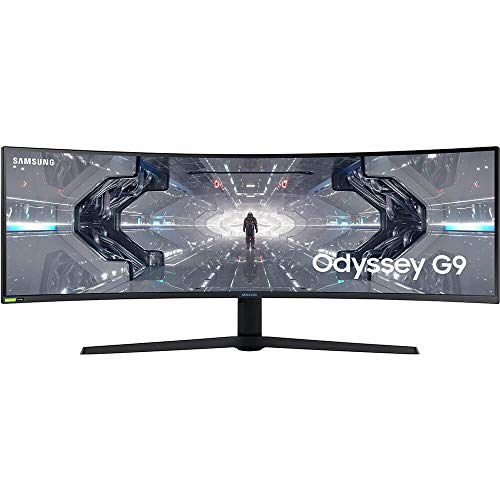
Description
SAMSUNG 49” Odyssey G9 Gaming Monitor, 1000R – Features & Prices in Saudi Arabia :
SAMSUNG 49” Odyssey G9 Gaming Monitor, 1000R Curved Screen, QLED, Dual QHD Display, 240Hz, NVIDIA G-SYNC and FreeSync Premium Pro, LC49G95TSSNXZA, Black
Standing screen display size
48.7 Inches
Screen Resolution
2560 x 1440
Max Screen Resolution
5120 x 1440 Pixels
Item Weight
31.1 pounds
Product Dimensions
16.39 x 45.18 x 21.15 inches
Item Dimensions LxWxH
16.39 x 45.18 x 21.15 inches
Color
BLACK
Voltage
110 Volts
Manufacturer
Samsung
ASIN
B088HH6LW5
Country of Origin
China
Is Discontinued By Manufacturer
No
Date First Available
June 14, 2020
Test video – SAMSUNG 49” Odyssey G9 Gaming Monitor, 1000R :
Product highlights :
Questions & Answers – SAMSUNG 49” Odyssey G9 Gaming Monitor, 1000R :
Technical specifications – SAMSUNG 49” Odyssey G9 Gaming Monitor, 1000R :
Screen Size
48.7 Inches
Display Resolution Maximum
5120 x 1440 Pixels
Brand
SAMSUNG
Special Feature
Ultrawide Screen, Curved
Refresh Rate
240 Hz
Purchase advice :
-
Warranty :
Check the duration of the warranty and also the faults and defects it covers. Is it complete or limited? and What is included in the warranty (parts, repairs or both)?
-
Shipping :
Is delivery offered? And how long does it take to get delivered (Delivery time)
-
Proof of purchase :
Does the shop give you an invoice ?
-
After-sales service :
Do they have an after-sales service to have information about the installation or operation (instructions for use). Also in case of problem, it is the seller who takes charge or you must contact the manufacturer or supplier yourself.
_____________________________

T. I (verified owner) –
Works PERFECT. It’s… AMAZING, My research / buying experience – This monitor truly lives up to its hype. After much research and some short on hand experience with the ultra wide monitors, I have finally decided on the colossal Odyssey G9. In this long review, I will also give you guys what table mount I used which is also available on amazon, and what dp cable I used as well. I am currently running this monitor on a Asus GX701 / 2080 MaxQ.
O. A (verified owner) –
– 3 Months Later:
K. A (verified owner) –
– I read online forums and watched all the Youtubers for 3-4 months before purchasing this monitor. My two worries were scaling applications easily like a two monitor setup, and if a 2060 video card could push hard enough to play games as 30X0 series video cards are nearly impossible to find at the time of this review. There’s a downloadable app called PowerToys with a something called “Fancy Windows” that allows you to divide up the screen very easily for productivity apps and it’s actually glorious for me. I have 3 apps divided up evenly on the screen and there is lots of real-estate for it at the native 5140×1440. I had thought that I would have to run the 2060 video at 1080p, but have been surprised that by turning down to medium settings in games I can 70-90 fps in top titles at the full native resolution. I know most people would prefer to see over 100 fps, including me, but whether it’s g-sync or something else, it feels smooth and is truly incredible. Far Cry 5, Witcher 3, Doom Ultimate, Battlefield 4, Battle Front 2, Elder Scrolls online all look great with minimal to no stretching at the sides. Fallout 76 is a mess as it has terrible support for Ultrawide. I only had to turn one game down to 1080p and I honestly cannot really tell. RTX is unusable dropping even Quake RTX down to 13 fps but it was never a great option on a 2060 anyway. In terms of the monitor itself. HDMI sound is not working. I’m deciding if I want to try a firmware update to fix this. I’m not sure it’s that important to me. HDR is great in games and most games see it and turn it on without needing to turn on the dismal Windows implementation of HDR. The colour is great and the whites are very white. I didn’t know what I was missing with my old ASUS gaming monitor. I definitely recommend this to a gamer that is savvy with their tech. If you are not a tech type and are uncomfortable with changing resolution settings and fixing glitches when you change the wrong setting, you might want to wait until there is better windows and game support for these.
T. I (verified owner) –
Works PERFECT. It’s… AMAZING, My research / buying experience – This monitor truly lives up to its hype. After much research and some short on hand experience with the ultra wide monitors, I have finally decided on the colossal Odyssey G9. In this long review, I will also give you guys what table mount I used which is also available on amazon, and what dp cable I used as well. I am currently running this monitor on a Asus GX701 / 2080 MaxQ.
K. A (verified owner) –
– I read online forums and watched all the Youtubers for 3-4 months before purchasing this monitor. My two worries were scaling applications easily like a two monitor setup, and if a 2060 video card could push hard enough to play games as 30X0 series video cards are nearly impossible to find at the time of this review. There’s a downloadable app called PowerToys with a something called “Fancy Windows” that allows you to divide up the screen very easily for productivity apps and it’s actually glorious for me. I have 3 apps divided up evenly on the screen and there is lots of real-estate for it at the native 5140×1440. I had thought that I would have to run the 2060 video at 1080p, but have been surprised that by turning down to medium settings in games I can 70-90 fps in top titles at the full native resolution. I know most people would prefer to see over 100 fps, including me, but whether it’s g-sync or something else, it feels smooth and is truly incredible. Far Cry 5, Witcher 3, Doom Ultimate, Battlefield 4, Battle Front 2, Elder Scrolls online all look great with minimal to no stretching at the sides. Fallout 76 is a mess as it has terrible support for Ultrawide. I only had to turn one game down to 1080p and I honestly cannot really tell. RTX is unusable dropping even Quake RTX down to 13 fps but it was never a great option on a 2060 anyway. In terms of the monitor itself. HDMI sound is not working. I’m deciding if I want to try a firmware update to fix this. I’m not sure it’s that important to me. HDR is great in games and most games see it and turn it on without needing to turn on the dismal Windows implementation of HDR. The colour is great and the whites are very white. I didn’t know what I was missing with my old ASUS gaming monitor. I definitely recommend this to a gamer that is savvy with their tech. If you are not a tech type and are uncomfortable with changing resolution settings and fixing glitches when you change the wrong setting, you might want to wait until there is better windows and game support for these.
M. K (verified owner) –
– This is a beautiful monitor all I had to do is turn off local dimming and I have had zero issues. Nothing wrong with the build quality, no dead pixels. No flickering.
T. R (verified owner) –
It’s all about that curve. – Early review, as needed or in few months I’ll update.
M. K (verified owner) –
– This is a beautiful monitor all I had to do is turn off local dimming and I have had zero issues. Nothing wrong with the build quality, no dead pixels. No flickering.
T. R (verified owner) –
It’s all about that curve. – Early review, as needed or in few months I’ll update.
O. A (verified owner) –
– 3 Months Later: