
Description
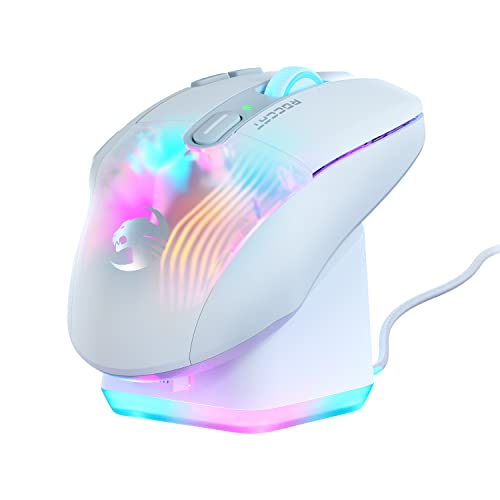
ROCCAT Kone XP Air – Wireless Customizable – Features & Prices in Saudi Arabia :
ROCCAT Kone XP Air – Wireless Customizable Ergonomic RGB Gaming Mouse, 19K DPI Optical Sensor, 100-hour Battery & Charging Dock, 29 Programmable Inputs & AIMO RGB Lighting, 4D Wheel – White
Brand
ROCCAT
Series
Kone XP Air White
Item model number
ROC-11-446-01
Hardware Platform
PC
Item Weight
3.5 ounces
Product Dimensions
2.8 x 4.96 x 1.6 inches
Item Dimensions LxWxH
2.8 x 4.96 x 1.6 inches
Color
White
Batteries
1 Lithium Polymer batteries required. (included)
Manufacturer
Turtle Beach
ASIN
B0B69XSSXF
Country of Origin
China
Date First Available
July 26, 2022
Test video – ROCCAT Kone XP Air – Wireless Customizable :
Product highlights :
Questions & Answers – ROCCAT Kone XP Air – Wireless Customizable :
Technical specifications – ROCCAT Kone XP Air – Wireless Customizable :
Purchase advice :
-
Warranty :
Check the duration of the warranty and also the faults and defects it covers. Is it complete or limited? and What is included in the warranty (parts, repairs or both)?
-
Shipping :
Is delivery offered? And how long does it take to get delivered (Delivery time)
-
Proof of purchase :
Does the shop give you an invoice ?
-
After-sales service :
Do they have an after-sales service to have information about the installation or operation (instructions for use). Also in case of problem, it is the seller who takes charge or you must contact the manufacturer or supplier yourself.
_____________________________
G. L (verified owner) –
– どこぞに分解記事がありまして、メインクリック以外のスイッチすべてにTTC社のマイクロスイッチが使われているようです。
J. B (verified owner) –
Great mouse, though has a couple drawbacks – This mouse is really good for the price, it has a great optical sensor on the bottom that is able to pick up any minor movement that you make. The app for the mouse has been lack luster for me it has been very spotty to me whenever I would try to open it up but when it is working there is no complaints. The biggest issue I have with it is the connectivity to the computer. I have the dongle and mouse synced up, I boot up a game and after maybe 5 minutes or a little more it starts to lose connection to the computer. It’s not a power problem which I have seen the mouse do this at both low battery and full. It seems I might have a range problem or if something gets in between the mouse and the dongle it does this. I really find this strange because before purchasing this product I had a Razer wireless mouse (a cheap one at that) and I put it through the same tests and it did not have any problems when it came to connectivity. I also have a complaint but it’s more personal than most, I don’t know if it’s to save battery or what but whenever I move the mouse or click the button the rgb lighting dims for 5-10 seconds. I can deal with it but I don’t know if that’s by design. Overall it is a great mouse to get even with it’s quirks and a great buy for any gamers
S. T (verified owner) –
Great mouse for those who like more buttons – If you are a user who prefers more buttons on a mouse, this is a good place to look. I have a couple versions of the G502 and they are really good buys. The latest one (Hero) is not too bad and tracks well, but the scroll wheel was lacking out of the box. Also, I wished it has more usable buttons. I also have a larger sized hand and I felt that I needed to unnecessarily grip the mouse tighter. It always felt too narrow for me. It is hard to even see in side by side photos, but the Kone XP is noticeably larger feeling in the hand than the G502.
T. F (verified owner) –
Comparing the Logitech G502 and G604 to the Kone XP – Computer mice are like women – why have one when you can have three. So that’s what I did – I got me the Logitech G502 and then the G604. Then Roccat came out with the Kone XP and I thought to myself…myself, methinks you need to try that mouse. So here’s the scoop –
T. F (verified owner) –
Comparing the Logitech G502 and G604 to the Kone XP – Computer mice are like women – why have one when you can have three. So that’s what I did – I got me the Logitech G502 and then the G604. Then Roccat came out with the Kone XP and I thought to myself…myself, methinks you need to try that mouse. So here’s the scoop –
J. B (verified owner) –
Great mouse, though has a couple drawbacks – This mouse is really good for the price, it has a great optical sensor on the bottom that is able to pick up any minor movement that you make. The app for the mouse has been lack luster for me it has been very spotty to me whenever I would try to open it up but when it is working there is no complaints. The biggest issue I have with it is the connectivity to the computer. I have the dongle and mouse synced up, I boot up a game and after maybe 5 minutes or a little more it starts to lose connection to the computer. It’s not a power problem which I have seen the mouse do this at both low battery and full. It seems I might have a range problem or if something gets in between the mouse and the dongle it does this. I really find this strange because before purchasing this product I had a Razer wireless mouse (a cheap one at that) and I put it through the same tests and it did not have any problems when it came to connectivity. I also have a complaint but it’s more personal than most, I don’t know if it’s to save battery or what but whenever I move the mouse or click the button the rgb lighting dims for 5-10 seconds. I can deal with it but I don’t know if that’s by design. Overall it is a great mouse to get even with it’s quirks and a great buy for any gamers
G. L (verified owner) –
– どこぞに分解記事がありまして、メインクリック以外のスイッチすべてにTTC社のマイクロスイッチが使われているようです。
G. M (verified owner) –
– Sehr gute Maus fürs Gaming. Hohe Qualität und schöne anzugucken. Gerne wieder
S. T (verified owner) –
Great mouse for those who like more buttons – If you are a user who prefers more buttons on a mouse, this is a good place to look. I have a couple versions of the G502 and they are really good buys. The latest one (Hero) is not too bad and tracks well, but the scroll wheel was lacking out of the box. Also, I wished it has more usable buttons. I also have a larger sized hand and I felt that I needed to unnecessarily grip the mouse tighter. It always felt too narrow for me. It is hard to even see in side by side photos, but the Kone XP is noticeably larger feeling in the hand than the G502.
G. M (verified owner) –
– Sehr gute Maus fürs Gaming. Hohe Qualität und schöne anzugucken. Gerne wieder