Redragon M801 Gaming Mouse LED RGB Backlit – Features & Prices in Saudi Arabia :
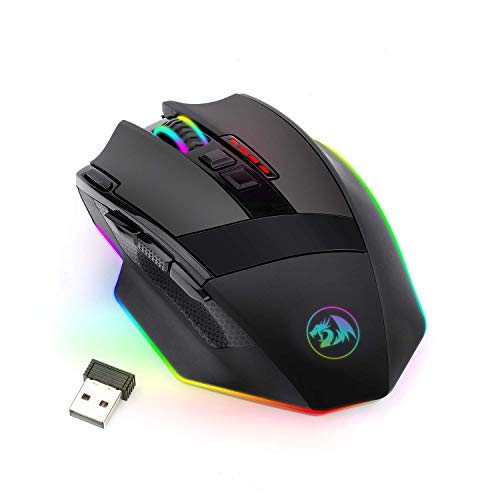
Redragon M801 Gaming Mouse LED RGB Backlit MMO 9 Programmable Buttons Mouse with Macro Recording Side Buttons Rapid Fire Button 16000 DPI for Windows PC Gamer (Wireless, Black)
Product Dimensions
4.76 x 3.27 x 1.69 inches
Item Weight
4.2 ounces
ASIN
B07VFQMVRL
Batteries
1 Lithium Polymer batteries required. (included)
Date First Available
July 18, 2019
Manufacturer
Redragon
Test video – Redragon M801 Gaming Mouse LED RGB Backlit :
Product highlights :
PROFESSIONAL GRADE WIRED / WIRELESS GAMING MOUSE; featuring ultra-fast lag free wired or wireless connection. The rechargeable mouse features a battery life up to 35 hours (RGB LED on) up to 70 hours (RGB LED off) on a single charge. Pro Gaming features with 16000 user adjustable DPI and 40G acceleration. The High-Precision Sensor delivers Pinpoint Accuracy and extreme responsiveness during PC Gaming or Computer editing
RGB BACKLIT PROGRAMMABLE PC GAMING MOUSE; with 8 Lighting Effects, 10 Brightness Levels, Breathing Modes, (Backlight can be disabled), 9 user programmable buttons, 2 Side Buttons, Rapid Fire Button, 5 Memory Profiles with Macro Recording
ERGONOMIC GAMER MOUSE; Delivering an extremely comfortable and precise experience for Computer Games.
MMO GAMING MOUSE FEATURES; The Redragon M801P RGB Mouse features; Set Anti-Skid Scroll Wheel, Durable smooth TEFLON feet pads for ultimate gaming control. 9 programmable buttons. Comes with detachable 6 foot, 3mm strong high-speed braided fiber USB-C cable
PC GAMING MOUSE COMPATIBILITY: Windows 10, Windows 8, Windows 7, Windows Vista, or Windows XP, Limited Mac OS support Works well with all major Gaming Computers Brands and Gaming Laptops.
➕ What is the price of Redragon M801 Gaming Mouse LED RGB Backlit in Saudi Arabia ?
The price of Redragon M801 Gaming Mouse LED RGB Backlit in-store is 180 SAR VAT.
➕ When Redragon M801 Gaming Mouse LED RGB Backlit was released ?
The release date was July 18, 2019.
➕ What is the price of Redragon M801 Gaming Mouse LED RGB Backlit cheap used ?
The price of Redragon M801 Gaming Mouse LED RGB Backlit used is 120 SAR VAT.
➕ What are the main characteristics of Redragon M801 Gaming Mouse LED RGB Backlit ?
Special specifications :
PROFESSIONAL GRADE WIRED / WIRELESS GAMING MOUSE; featuring ultra-fast lag free wired or wireless connection. The rechargeable mouse features a battery life up to 35 hours (RGB LED on) up to 70 hours (RGB LED off) on a single charge. Pro Gaming features with 16000 user adjustable DPI and 40G acceleration. The High-Precision Sensor delivers Pinpoint Accuracy and extreme responsiveness during PC Gaming or Computer editing
➕ Is it interesting to buy this product ?
The best people who can answer you are customers who have already bought and tested this product (See Customer Reviews). This product is rated 4.6 / 5 on Amazon.
➕ Where to buy Redragon M801 Gaming Mouse LED RGB Backlit in Saudi Arabia ?
Check the duration of the warranty and also the faults and defects it covers. Is it complete or limited? and What is included in the warranty (parts, repairs or both)?
Shipping :
Is delivery offered? And how long does it take to get delivered (Delivery time)
Proof of purchase :
Does the shop give you an invoice ?
After-sales service :
Do they have an after-sales service to have information about the installation or operation (instructions for use). Also in case of problem, it is the seller who takes charge or you must contact the manufacturer or supplier yourself.
_____________________________
10 reviews for Redragon M801 Gaming Mouse LED RGB Backlit
Rated 5 out of 5
O. J (verified owner)–
My Favorite All-Use Mouse – The Redragon M801 has been my daily driver for a little over a year now, and every time I use a different mouse, I am so appreciative of my M801. I wouldn’t say I have large hands, but on the bigger size, and I don’t like the feeling that most mouse’s (mice?) have because they just feel too small. I took a chance on the M801 that it would be a nice sized mouse and I’m glad I did because it is literally perfect. if you have small hands, or you like having a super light mouse, this may not be a good option for you. BUT, if you like the styling, the ergonomic design (which is very comfortable for all day use) and you want a little RGB for gaming, then this is the mouse for you!. there are quite a few DPI settings that you can change with the click of a button, you can turn the RGB off if you want to use the mouse in an office setting as well. AND THE BATTERY LIFE, holy moly does the battery last a long time on this mouse. I don’t think I even charged it for the first month of every day use the battery lasts so long. The LED scroll wheel will glow red when the battery needs a charge, and the scroll wheel only lights up when its charging, which I thought was a BIT of a bummer but I got over it pretty quickly. Everyone that sees this mouse always asks me where i got it and what brand it is because it looks so nice. Overall an AWESOME mouse for the price. USB dongle stores magnetically underneath the mouse when not in use, and of course you can use it wired with the really nice braided nylon usb C cable that they include. the mouse also comes with a hard plastic carrying case thing which is nice if you want to store it somewhere but I tossed mine the day I got it
F. A (verified owner)–
– Works super well. Good battery life, slides smoothly, has lots of useful buttons. Blinks yellow to let you know that it’s low on power; you just plug the cable into it and keep rolling. Only minor complaint is that the cable that came with it is super stiff to the point that it interferes with using the mouse to a small degree. USB-C cables are still pretty expensive so this effectively adds significantly to the price if you want to replace it with something better. OTOH you only need to have the cable connected for maybe 1/4 of the time you use the mouse—if you charge it consistently at night I doubt you’ll need to have it connected during use at all.
Rated 5 out of 5
M. K (verified owner)–
45$ is a deal for this – Had one for a year and a half, I broke the scroll wheel (my own fault) – got a logitec, and I’m returning the logitec for another one of these.
F. A (verified owner)–
– Works super well. Good battery life, slides smoothly, has lots of useful buttons. Blinks yellow to let you know that it’s low on power; you just plug the cable into it and keep rolling. Only minor complaint is that the cable that came with it is super stiff to the point that it interferes with using the mouse to a small degree. USB-C cables are still pretty expensive so this effectively adds significantly to the price if you want to replace it with something better. OTOH you only need to have the cable connected for maybe 1/4 of the time you use the mouse—if you charge it consistently at night I doubt you’ll need to have it connected during use at all.
Rated 5 out of 5
K. M (verified owner)–
I trade stocks with it. No accidental clicks. Great mouse – I am always buying and trying different mice because I trade the stock market. I hate a mouse that the weight of my finger causes an accidental click because I’m always randomly buying into a position in a stock I don’t want to be in and it always causes me to lose money. Half the time I don’t even know it unless I have the volume turned up on my laptop and I heard the order filled sound. I ordered a Logitech G603 and got it in the mail several days ago as well but i still got accidental clicks with it because the buttons were too easy to press. Not what I wanted. This sniper pro is perfect. I have to purposefully click it to get a click. I can hear the clicks which I also like. It’s super cool looking, and much more comfortable than any other mouse I’ve had. It’s on the larger side for my small man hands which I like as it helps keep my fingers off whatever surface I’m using it on. I don’t like my pinky finger getting drug around all the time. I wish I could change the color on the scroll wheel though as it’s green and I don’t like green. I can live with it though as I still really like this mouse. I haven’t used it for gaming so can’t comment on that.
Rated 5 out of 5
O. J (verified owner)–
My Favorite All-Use Mouse – The Redragon M801 has been my daily driver for a little over a year now, and every time I use a different mouse, I am so appreciative of my M801. I wouldn’t say I have large hands, but on the bigger size, and I don’t like the feeling that most mouse’s (mice?) have because they just feel too small. I took a chance on the M801 that it would be a nice sized mouse and I’m glad I did because it is literally perfect. if you have small hands, or you like having a super light mouse, this may not be a good option for you. BUT, if you like the styling, the ergonomic design (which is very comfortable for all day use) and you want a little RGB for gaming, then this is the mouse for you!. there are quite a few DPI settings that you can change with the click of a button, you can turn the RGB off if you want to use the mouse in an office setting as well. AND THE BATTERY LIFE, holy moly does the battery last a long time on this mouse. I don’t think I even charged it for the first month of every day use the battery lasts so long. The LED scroll wheel will glow red when the battery needs a charge, and the scroll wheel only lights up when its charging, which I thought was a BIT of a bummer but I got over it pretty quickly. Everyone that sees this mouse always asks me where i got it and what brand it is because it looks so nice. Overall an AWESOME mouse for the price. USB dongle stores magnetically underneath the mouse when not in use, and of course you can use it wired with the really nice braided nylon usb C cable that they include. the mouse also comes with a hard plastic carrying case thing which is nice if you want to store it somewhere but I tossed mine the day I got it
Rated 5 out of 5
G. T (verified owner)–
Works wonderfully. Full week of gaming on one charge. Fast response. – Up to now, I’d only used big brand name mouses like LogiTech and Microsoft ones. But after my 2nd Logitech mouse giving me the accursed double-click problem, I’d had enough and ventured out. This mouse was highly rated, so I gave it a try.
Rated 5 out of 5
K. M (verified owner)–
I trade stocks with it. No accidental clicks. Great mouse – I am always buying and trying different mice because I trade the stock market. I hate a mouse that the weight of my finger causes an accidental click because I’m always randomly buying into a position in a stock I don’t want to be in and it always causes me to lose money. Half the time I don’t even know it unless I have the volume turned up on my laptop and I heard the order filled sound. I ordered a Logitech G603 and got it in the mail several days ago as well but i still got accidental clicks with it because the buttons were too easy to press. Not what I wanted. This sniper pro is perfect. I have to purposefully click it to get a click. I can hear the clicks which I also like. It’s super cool looking, and much more comfortable than any other mouse I’ve had. It’s on the larger side for my small man hands which I like as it helps keep my fingers off whatever surface I’m using it on. I don’t like my pinky finger getting drug around all the time. I wish I could change the color on the scroll wheel though as it’s green and I don’t like green. I can live with it though as I still really like this mouse. I haven’t used it for gaming so can’t comment on that.
Rated 5 out of 5
G. T (verified owner)–
Works wonderfully. Full week of gaming on one charge. Fast response. – Up to now, I’d only used big brand name mouses like LogiTech and Microsoft ones. But after my 2nd Logitech mouse giving me the accursed double-click problem, I’d had enough and ventured out. This mouse was highly rated, so I gave it a try.
Rated 5 out of 5
M. K (verified owner)–
45$ is a deal for this – Had one for a year and a half, I broke the scroll wheel (my own fault) – got a logitec, and I’m returning the logitec for another one of these.

O. J (verified owner) –
My Favorite All-Use Mouse – The Redragon M801 has been my daily driver for a little over a year now, and every time I use a different mouse, I am so appreciative of my M801. I wouldn’t say I have large hands, but on the bigger size, and I don’t like the feeling that most mouse’s (mice?) have because they just feel too small. I took a chance on the M801 that it would be a nice sized mouse and I’m glad I did because it is literally perfect. if you have small hands, or you like having a super light mouse, this may not be a good option for you. BUT, if you like the styling, the ergonomic design (which is very comfortable for all day use) and you want a little RGB for gaming, then this is the mouse for you!. there are quite a few DPI settings that you can change with the click of a button, you can turn the RGB off if you want to use the mouse in an office setting as well. AND THE BATTERY LIFE, holy moly does the battery last a long time on this mouse. I don’t think I even charged it for the first month of every day use the battery lasts so long. The LED scroll wheel will glow red when the battery needs a charge, and the scroll wheel only lights up when its charging, which I thought was a BIT of a bummer but I got over it pretty quickly. Everyone that sees this mouse always asks me where i got it and what brand it is because it looks so nice. Overall an AWESOME mouse for the price. USB dongle stores magnetically underneath the mouse when not in use, and of course you can use it wired with the really nice braided nylon usb C cable that they include. the mouse also comes with a hard plastic carrying case thing which is nice if you want to store it somewhere but I tossed mine the day I got it
F. A (verified owner) –
– Works super well. Good battery life, slides smoothly, has lots of useful buttons. Blinks yellow to let you know that it’s low on power; you just plug the cable into it and keep rolling. Only minor complaint is that the cable that came with it is super stiff to the point that it interferes with using the mouse to a small degree. USB-C cables are still pretty expensive so this effectively adds significantly to the price if you want to replace it with something better. OTOH you only need to have the cable connected for maybe 1/4 of the time you use the mouse—if you charge it consistently at night I doubt you’ll need to have it connected during use at all.
M. K (verified owner) –
45$ is a deal for this – Had one for a year and a half, I broke the scroll wheel (my own fault) – got a logitec, and I’m returning the logitec for another one of these.
F. A (verified owner) –
– Works super well. Good battery life, slides smoothly, has lots of useful buttons. Blinks yellow to let you know that it’s low on power; you just plug the cable into it and keep rolling. Only minor complaint is that the cable that came with it is super stiff to the point that it interferes with using the mouse to a small degree. USB-C cables are still pretty expensive so this effectively adds significantly to the price if you want to replace it with something better. OTOH you only need to have the cable connected for maybe 1/4 of the time you use the mouse—if you charge it consistently at night I doubt you’ll need to have it connected during use at all.
K. M (verified owner) –
I trade stocks with it. No accidental clicks. Great mouse – I am always buying and trying different mice because I trade the stock market. I hate a mouse that the weight of my finger causes an accidental click because I’m always randomly buying into a position in a stock I don’t want to be in and it always causes me to lose money. Half the time I don’t even know it unless I have the volume turned up on my laptop and I heard the order filled sound. I ordered a Logitech G603 and got it in the mail several days ago as well but i still got accidental clicks with it because the buttons were too easy to press. Not what I wanted. This sniper pro is perfect. I have to purposefully click it to get a click. I can hear the clicks which I also like. It’s super cool looking, and much more comfortable than any other mouse I’ve had. It’s on the larger side for my small man hands which I like as it helps keep my fingers off whatever surface I’m using it on. I don’t like my pinky finger getting drug around all the time. I wish I could change the color on the scroll wheel though as it’s green and I don’t like green. I can live with it though as I still really like this mouse. I haven’t used it for gaming so can’t comment on that.
O. J (verified owner) –
My Favorite All-Use Mouse – The Redragon M801 has been my daily driver for a little over a year now, and every time I use a different mouse, I am so appreciative of my M801. I wouldn’t say I have large hands, but on the bigger size, and I don’t like the feeling that most mouse’s (mice?) have because they just feel too small. I took a chance on the M801 that it would be a nice sized mouse and I’m glad I did because it is literally perfect. if you have small hands, or you like having a super light mouse, this may not be a good option for you. BUT, if you like the styling, the ergonomic design (which is very comfortable for all day use) and you want a little RGB for gaming, then this is the mouse for you!. there are quite a few DPI settings that you can change with the click of a button, you can turn the RGB off if you want to use the mouse in an office setting as well. AND THE BATTERY LIFE, holy moly does the battery last a long time on this mouse. I don’t think I even charged it for the first month of every day use the battery lasts so long. The LED scroll wheel will glow red when the battery needs a charge, and the scroll wheel only lights up when its charging, which I thought was a BIT of a bummer but I got over it pretty quickly. Everyone that sees this mouse always asks me where i got it and what brand it is because it looks so nice. Overall an AWESOME mouse for the price. USB dongle stores magnetically underneath the mouse when not in use, and of course you can use it wired with the really nice braided nylon usb C cable that they include. the mouse also comes with a hard plastic carrying case thing which is nice if you want to store it somewhere but I tossed mine the day I got it
G. T (verified owner) –
Works wonderfully. Full week of gaming on one charge. Fast response. – Up to now, I’d only used big brand name mouses like LogiTech and Microsoft ones. But after my 2nd Logitech mouse giving me the accursed double-click problem, I’d had enough and ventured out. This mouse was highly rated, so I gave it a try.
K. M (verified owner) –
I trade stocks with it. No accidental clicks. Great mouse – I am always buying and trying different mice because I trade the stock market. I hate a mouse that the weight of my finger causes an accidental click because I’m always randomly buying into a position in a stock I don’t want to be in and it always causes me to lose money. Half the time I don’t even know it unless I have the volume turned up on my laptop and I heard the order filled sound. I ordered a Logitech G603 and got it in the mail several days ago as well but i still got accidental clicks with it because the buttons were too easy to press. Not what I wanted. This sniper pro is perfect. I have to purposefully click it to get a click. I can hear the clicks which I also like. It’s super cool looking, and much more comfortable than any other mouse I’ve had. It’s on the larger side for my small man hands which I like as it helps keep my fingers off whatever surface I’m using it on. I don’t like my pinky finger getting drug around all the time. I wish I could change the color on the scroll wheel though as it’s green and I don’t like green. I can live with it though as I still really like this mouse. I haven’t used it for gaming so can’t comment on that.
G. T (verified owner) –
Works wonderfully. Full week of gaming on one charge. Fast response. – Up to now, I’d only used big brand name mouses like LogiTech and Microsoft ones. But after my 2nd Logitech mouse giving me the accursed double-click problem, I’d had enough and ventured out. This mouse was highly rated, so I gave it a try.
M. K (verified owner) –
45$ is a deal for this – Had one for a year and a half, I broke the scroll wheel (my own fault) – got a logitec, and I’m returning the logitec for another one of these.