
Description
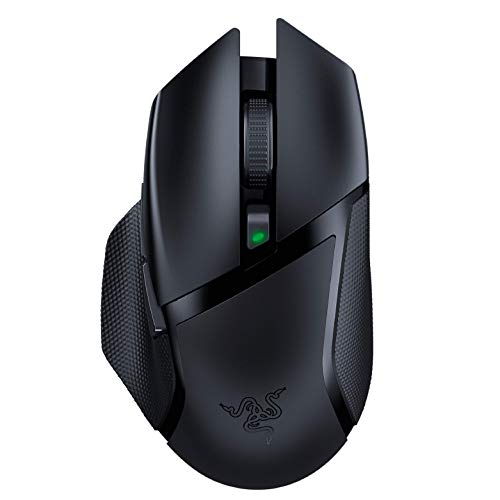
Razer Basilisk X Hyperspeed Wireless Gaming Mouse: – Features & Prices in Saudi Arabia :
Razer Basilisk X Hyperspeed Wireless Gaming Mouse: Bluetooth & Wireless Compatible, 16K DPI Optical Sensor, 6 Programmable Buttons, 450 Hr Battery, Classic Black
Average Battery Life (in hours)
450 Hours
Series
Basilisk X HyperSpeed
Item model number
RZ01-03150100-R3U1
Hardware Platform
PC
Item Weight
7 ounces
Product Dimensions
5.11 x 2.36 x 1.65 inches
Item Dimensions LxWxH
5.11 x 2.36 x 1.65 inches
Color
Black
Power Source
Battery Powered
Batteries
1 Lithium Ion batteries required. (included)
Department
mouse
Manufacturer
Razer Inc.
ASIN
B07YPBQSCK
Country of Origin
China
Is Discontinued By Manufacturer
No
Date First Available
November 6, 2019
Test video – Razer Basilisk X Hyperspeed Wireless Gaming Mouse: :
Product highlights :
Questions & Answers – Razer Basilisk X Hyperspeed Wireless Gaming Mouse: :
Technical specifications – Razer Basilisk X Hyperspeed Wireless Gaming Mouse: :
Brand
Razer
Color
Black
Connectivity Technology
Bluetooth
Special Feature
Wireless
Movement Detection Technology
Optical
Purchase advice :
-
Warranty :
Check the duration of the warranty and also the faults and defects it covers. Is it complete or limited? and What is included in the warranty (parts, repairs or both)?
-
Shipping :
Is delivery offered? And how long does it take to get delivered (Delivery time)
-
Proof of purchase :
Does the shop give you an invoice ?
-
After-sales service :
Do they have an after-sales service to have information about the installation or operation (instructions for use). Also in case of problem, it is the seller who takes charge or you must contact the manufacturer or supplier yourself.
_____________________________
Z. B (verified owner) –
Great mouse + works with mac – I bought it for my sister for gaming as apple’s Magic Mouse had weird binds in games that couldn’t be I’m done (specifically right and left click were the same) so I bought this for her. Works flawlessly and she uses it all the time. She says it’s comfortable on her hand and that she probably won’t use the Magic Mouse now. (whoops, I guess?)
A. F (verified owner) –
How is this not Expensive? – I had been using a cheap wireless office mouse for everything, but I found myself wanting something better during quarantine. I bought a cheap wired mouse and then upgraded to this, which shocked me. How is this not more expensive? The battery life is insane. I’m the kind of person that changes batteries way too soon “just in case,” and I’ve still only changed the single AA battery once in probably around two years now. If I hadn’t It would probably still be going. Using the included dongle definitely consumes less power than bluetooth, but I have switched back and forth this whole time and not experienced anything but satisfaction and confusion as to how this is priced so affordably with its great quality and ergonomics. I recommend this mouse to anyone who asks and sometimes to anyone who doesn’t.
A. F (verified owner) –
How is this not Expensive? – I had been using a cheap wireless office mouse for everything, but I found myself wanting something better during quarantine. I bought a cheap wired mouse and then upgraded to this, which shocked me. How is this not more expensive? The battery life is insane. I’m the kind of person that changes batteries way too soon “just in case,” and I’ve still only changed the single AA battery once in probably around two years now. If I hadn’t It would probably still be going. Using the included dongle definitely consumes less power than bluetooth, but I have switched back and forth this whole time and not experienced anything but satisfaction and confusion as to how this is priced so affordably with its great quality and ergonomics. I recommend this mouse to anyone who asks and sometimes to anyone who doesn’t.
B. B (verified owner) –
Great Razer Gaming Mouse with Dual Connectivity – I’m not an Apple fan-boy, but I do love my MacBook Pro 14 M1 Pro…just love it. With that in mind, I wanted to flex the mini-LED screen of my beloved with games like CoD, so of course I needed a decent gaming mouse that would be up to the FPS tasks the game would throw at me. Trouble was I didn’t want a USB-A dongle sticking way out of my otherwise puma sleek beauty of a laptop (even more so because in order to use the dongle, I would have to use a USB-A to USB-C adaptor, which would just look ridiculous – COME ON Razer, Logitech, and a host of other manufacturers, why haven’t you yet embraced USB-C 2.4 GHz dongles), which really limits me to two just gaming mouse offerings from the two big boys: Razer and Logitech, that have Bluetooth connectivity onboard. I grabbed this mouse on super sale, and so far I’m pretty happy. It’s not a flagship Razer mouse; it lacks a rechargeable battery, wireless recharging, and even lacks the snappy looking LED lights found on so many gaming mice, which I personally really like…within reason. But this mouse is a bonafide gaming mouse with a DPI and polling rate to match, and equally importantly, this mouse has excellent ergonomics for right-handed people (left click button is higher and at a different angle than the right click, making it incredibly comfortable to use). Sorry left-handed people…though you are in the minority by quite a bit here. Anyway, if you’re looking for an inexpensive, no frills, but effective, dual-connectivity mouse with great ergonomics, I recommend giving this one a go.
O. T (verified owner) –
Great price for the quality – Firstly, one important thing to address is that this is a review for the Razer Basilisk X mouse, not the Razer Basilisk Ultimate, which is the majorly upgraded version of the mouse. Most reviews, for some reason, are of the Basilisk Ultimate, but with the one picture and the one you order on this page, you will be getting the battery powered Razer Basilisk X.
Z. B (verified owner) –
Great mouse + works with mac – I bought it for my sister for gaming as apple’s Magic Mouse had weird binds in games that couldn’t be I’m done (specifically right and left click were the same) so I bought this for her. Works flawlessly and she uses it all the time. She says it’s comfortable on her hand and that she probably won’t use the Magic Mouse now. (whoops, I guess?)
O. T (verified owner) –
Great price for the quality – Firstly, one important thing to address is that this is a review for the Razer Basilisk X mouse, not the Razer Basilisk Ultimate, which is the majorly upgraded version of the mouse. Most reviews, for some reason, are of the Basilisk Ultimate, but with the one picture and the one you order on this page, you will be getting the battery powered Razer Basilisk X.
H. K (verified owner) –
Great value for 35$ – The mouse is extemely comfortable. Running off of replacable batteries is nice because I don’t have to worry about battery degradation or having to charge it. I also appreciate that if I ever lose the wireless dongle I can just use the bluetooth mode instead. You can also use this to have two devices connected to the mouse, one via dongle and one via bluetooth. If you are a super hardcore FPS gamer who absolutely must have a really light mouse, this probably isn’t for you, but I still like playing FPS games with it.
B. B (verified owner) –
Great Razer Gaming Mouse with Dual Connectivity – I’m not an Apple fan-boy, but I do love my MacBook Pro 14 M1 Pro…just love it. With that in mind, I wanted to flex the mini-LED screen of my beloved with games like CoD, so of course I needed a decent gaming mouse that would be up to the FPS tasks the game would throw at me. Trouble was I didn’t want a USB-A dongle sticking way out of my otherwise puma sleek beauty of a laptop (even more so because in order to use the dongle, I would have to use a USB-A to USB-C adaptor, which would just look ridiculous – COME ON Razer, Logitech, and a host of other manufacturers, why haven’t you yet embraced USB-C 2.4 GHz dongles), which really limits me to two just gaming mouse offerings from the two big boys: Razer and Logitech, that have Bluetooth connectivity onboard. I grabbed this mouse on super sale, and so far I’m pretty happy. It’s not a flagship Razer mouse; it lacks a rechargeable battery, wireless recharging, and even lacks the snappy looking LED lights found on so many gaming mice, which I personally really like…within reason. But this mouse is a bonafide gaming mouse with a DPI and polling rate to match, and equally importantly, this mouse has excellent ergonomics for right-handed people (left click button is higher and at a different angle than the right click, making it incredibly comfortable to use). Sorry left-handed people…though you are in the minority by quite a bit here. Anyway, if you’re looking for an inexpensive, no frills, but effective, dual-connectivity mouse with great ergonomics, I recommend giving this one a go.
H. K (verified owner) –
Great value for 35$ – The mouse is extemely comfortable. Running off of replacable batteries is nice because I don’t have to worry about battery degradation or having to charge it. I also appreciate that if I ever lose the wireless dongle I can just use the bluetooth mode instead. You can also use this to have two devices connected to the mouse, one via dongle and one via bluetooth. If you are a super hardcore FPS gamer who absolutely must have a really light mouse, this probably isn’t for you, but I still like playing FPS games with it.