Pink Mechanical Gaming Keyboard and Mouse Combo – Features & Prices in Saudi Arabia :
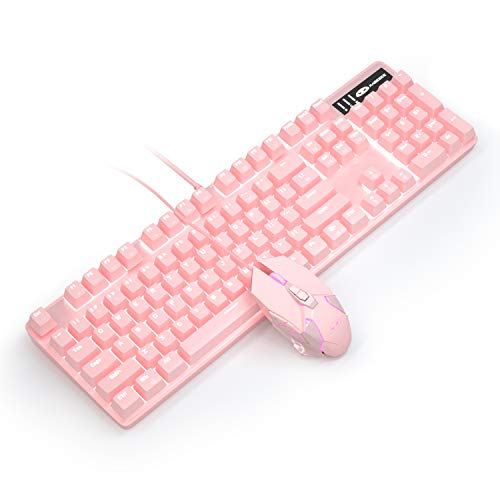
Pink Mechanical Gaming Keyboard and Mouse Combo Blue Switch 104 Keys White Backlit Keyboards, 7 Button Mouse Wired for Windows, Computer, Desktop, PC, Notebook, Laptop(Pink)
Product Dimensions
16.2 x 6.79 x 1.93 inches
Item Weight
3.03 pounds
Manufacturer
MageGee
ASIN
B082YV3JLD
Date First Available
December 20, 2019
Test video – Pink Mechanical Gaming Keyboard and Mouse Combo :
Product highlights :
Gaming Keyboard and Mouse – Both keyboard and mouse with white lighting effect, 20 backlit modes gaming keyboard and 7 color effect gaming mouse, creates a cool and colorful game atmosphere to enhance the excitement of the game. Best for pc games.
Mechanical Keyboard – With all-Metal Panel and floating keys design, the keys of keyboard trigger sensitively, all 104 keys have individual switches with full n-key rollover.
Gaming Mouse – Wired mouse with 4 DPI levels available from 800/1600/ 2400/ 3200 DPI, you can easily adjust the DPI to match the mouse speed instantly for different game scenarios.
Ergonomic Keyboard – The keyboard adopts ergonomic design to make it pretty comfortable to type on without wrist support. Two-color injection keycaps provide clear uniform backlit, ensuring that all letters are resistant to scratches, abrasion and fading. Easy to use, no driver needed, just plug and play.
Keyboard and Gaming Mouse – Compatibility with Windows 2000/Vista/Win7/Win8/Win10/MAC/Linux for gaming pc.
➕ What is the price of Pink Mechanical Gaming Keyboard and Mouse Combo in Saudi Arabia ?
The price of Pink Mechanical Gaming Keyboard and Mouse Combo in-store is 110 SAR VAT.
➕ When Pink Mechanical Gaming Keyboard and Mouse Combo was released ?
The release date was December 20, 2019.
➕ What is the price of Pink Mechanical Gaming Keyboard and Mouse Combo cheap used ?
The price of Pink Mechanical Gaming Keyboard and Mouse Combo used is 70 SAR VAT.
➕ What are the main characteristics of Pink Mechanical Gaming Keyboard and Mouse Combo ?
Special specifications :
Gaming Keyboard and Mouse – Both keyboard and mouse with white lighting effect, 20 backlit modes gaming keyboard and 7 color effect gaming mouse, creates a cool and colorful game atmosphere to enhance the excitement of the game. Best for pc games.
➕ Is it interesting to buy this product ?
The best people who can answer you are customers who have already bought and tested this product (See Customer Reviews). This product is rated 4.6 / 5 on Amazon.
➕ Where to buy Pink Mechanical Gaming Keyboard and Mouse Combo in Saudi Arabia ?
Check the duration of the warranty and also the faults and defects it covers. Is it complete or limited? and What is included in the warranty (parts, repairs or both)?
Shipping :
Is delivery offered? And how long does it take to get delivered (Delivery time)
Proof of purchase :
Does the shop give you an invoice ?
After-sales service :
Do they have an after-sales service to have information about the installation or operation (instructions for use). Also in case of problem, it is the seller who takes charge or you must contact the manufacturer or supplier yourself.
_____________________________
16 reviews for Pink Mechanical Gaming Keyboard and Mouse Combo
Rated 5 out of 5
M. H (verified owner)–
How to change the colors on keyboard and mouse + Review – For the keyboard, there’s 6 designs for the light. Press the Fn button + the Ins (A1) for the 1st design and then the Home, PgUp, Del, End, and PgDn for the other 5 designs. To change the color of the mouse press the bottom Dpi button plus the forward side button until it starts to blink a certain color, mine started Red, press just the forward side button until it has reached the color you want and then press the Dpi + forward side button to lock the color.
Rated 5 out of 5
M. H (verified owner)–
How to change the colors on keyboard and mouse + Review – For the keyboard, there’s 6 designs for the light. Press the Fn button + the Ins (A1) for the 1st design and then the Home, PgUp, Del, End, and PgDn for the other 5 designs. To change the color of the mouse press the bottom Dpi button plus the forward side button until it starts to blink a certain color, mine started Red, press just the forward side button until it has reached the color you want and then press the Dpi + forward side button to lock the color.
Rated 4 out of 5
P. F (verified owner)–
Cute, but noisy – It’s a really great keyboard, though the keys are obnoxiously clicky. There is only one color light (white), though there are several options to change the pattern. Overall, if you don’t really mind a lot of noise when you type or play, then this is a good buy for the cost.
Rated 4 out of 5
B. H (verified owner)–
Good quality for the price – (8/6/21) I bought this keyboard because I needed something to match my setup on a budget. I’m impressed with how good quality it is due to the low price. I’ve been using it for the past few days and I’m fairly happy with it so far. My biggest problem lies with the mouse, just really not a fan. I find that it’s not very responsive, I may have just gotten a defective one though. Not really worth the hassle of returning, I’ll be buying a different mouse so I knocked a star off for that. Otherwise, it works fairly well. Definitely not something I’ll be using forever, but it seems to work while you’re on a budget!
Rated 3 out of 5
S. J (verified owner)–
broke after a month – I really don’t use this keyboard often but all of a sudden it began disconnecting/reconnecting a ton, and a function/lock key got stuck and I’m unable to use this at all. It’s cute but I don’t recommend.
Rated 4 out of 5
A. H (verified owner)–
Cheap cute pinky keyboard – The switch : quality is ok, it come with Blue switches, very good for typing and gaming is ok.
Rated 4 out of 5
P. F (verified owner)–
Cute, but noisy – It’s a really great keyboard, though the keys are obnoxiously clicky. There is only one color light (white), though there are several options to change the pattern. Overall, if you don’t really mind a lot of noise when you type or play, then this is a good buy for the cost.
Rated 5 out of 5
G. B (verified owner)–
It works good with my job desktop computer – Not used for Gaming
Rated 5 out of 5
G. B (verified owner)–
It works good with my job desktop computer – Not used for Gaming
Rated 4 out of 5
A. H (verified owner)–
Cheap cute pinky keyboard – The switch : quality is ok, it come with Blue switches, very good for typing and gaming is ok.
Rated 3 out of 5
S. J (verified owner)–
broke after a month – I really don’t use this keyboard often but all of a sudden it began disconnecting/reconnecting a ton, and a function/lock key got stuck and I’m unable to use this at all. It’s cute but I don’t recommend.
Rated 5 out of 5
L. F (verified owner)–
A bit too clicky for my liking but for the price and color? It’s perfect. – Marshmallowpuddin made a great short review on how to change the lighting themes on the keyboard. To add on, there’s also a 6th theme with Fn + ScrLk. You can also change the brightness of the lights by pressing Fn with the up and down arrow. Some of the lighting themes can have their speeds changed which is done by pressing Fn + – and Fn =. Although there’s no RGB lighting, these customizations are quite fun.
Rated 4 out of 5
G. O (verified owner)–
Does the Job – I’ll give it four stars. It’s a functioning keyboard, the light settings are super cool, and I love that the mouse changes colors, too. It’s a great, low cost alternative to those 80 dollar keyboards you see. It doesn’t have all the bells and whistles, sure, but it works.
Rated 5 out of 5
L. F (verified owner)–
A bit too clicky for my liking but for the price and color? It’s perfect. – Marshmallowpuddin made a great short review on how to change the lighting themes on the keyboard. To add on, there’s also a 6th theme with Fn + ScrLk. You can also change the brightness of the lights by pressing Fn with the up and down arrow. Some of the lighting themes can have their speeds changed which is done by pressing Fn + – and Fn =. Although there’s no RGB lighting, these customizations are quite fun.
Rated 4 out of 5
G. O (verified owner)–
Does the Job – I’ll give it four stars. It’s a functioning keyboard, the light settings are super cool, and I love that the mouse changes colors, too. It’s a great, low cost alternative to those 80 dollar keyboards you see. It doesn’t have all the bells and whistles, sure, but it works.
Rated 4 out of 5
B. H (verified owner)–
Good quality for the price – (8/6/21) I bought this keyboard because I needed something to match my setup on a budget. I’m impressed with how good quality it is due to the low price. I’ve been using it for the past few days and I’m fairly happy with it so far. My biggest problem lies with the mouse, just really not a fan. I find that it’s not very responsive, I may have just gotten a defective one though. Not really worth the hassle of returning, I’ll be buying a different mouse so I knocked a star off for that. Otherwise, it works fairly well. Definitely not something I’ll be using forever, but it seems to work while you’re on a budget!


M. H (verified owner) –
How to change the colors on keyboard and mouse + Review – For the keyboard, there’s 6 designs for the light. Press the Fn button + the Ins (A1) for the 1st design and then the Home, PgUp, Del, End, and PgDn for the other 5 designs. To change the color of the mouse press the bottom Dpi button plus the forward side button until it starts to blink a certain color, mine started Red, press just the forward side button until it has reached the color you want and then press the Dpi + forward side button to lock the color.
M. H (verified owner) –
How to change the colors on keyboard and mouse + Review – For the keyboard, there’s 6 designs for the light. Press the Fn button + the Ins (A1) for the 1st design and then the Home, PgUp, Del, End, and PgDn for the other 5 designs. To change the color of the mouse press the bottom Dpi button plus the forward side button until it starts to blink a certain color, mine started Red, press just the forward side button until it has reached the color you want and then press the Dpi + forward side button to lock the color.
P. F (verified owner) –
Cute, but noisy – It’s a really great keyboard, though the keys are obnoxiously clicky. There is only one color light (white), though there are several options to change the pattern. Overall, if you don’t really mind a lot of noise when you type or play, then this is a good buy for the cost.
B. H (verified owner) –
Good quality for the price – (8/6/21) I bought this keyboard because I needed something to match my setup on a budget. I’m impressed with how good quality it is due to the low price. I’ve been using it for the past few days and I’m fairly happy with it so far. My biggest problem lies with the mouse, just really not a fan. I find that it’s not very responsive, I may have just gotten a defective one though. Not really worth the hassle of returning, I’ll be buying a different mouse so I knocked a star off for that. Otherwise, it works fairly well. Definitely not something I’ll be using forever, but it seems to work while you’re on a budget!
S. J (verified owner) –
broke after a month – I really don’t use this keyboard often but all of a sudden it began disconnecting/reconnecting a ton, and a function/lock key got stuck and I’m unable to use this at all. It’s cute but I don’t recommend.
A. H (verified owner) –
Cheap cute pinky keyboard – The switch : quality is ok, it come with Blue switches, very good for typing and gaming is ok.
P. F (verified owner) –
Cute, but noisy – It’s a really great keyboard, though the keys are obnoxiously clicky. There is only one color light (white), though there are several options to change the pattern. Overall, if you don’t really mind a lot of noise when you type or play, then this is a good buy for the cost.
G. B (verified owner) –
It works good with my job desktop computer – Not used for Gaming
G. B (verified owner) –
It works good with my job desktop computer – Not used for Gaming
A. H (verified owner) –
Cheap cute pinky keyboard – The switch : quality is ok, it come with Blue switches, very good for typing and gaming is ok.
S. J (verified owner) –
broke after a month – I really don’t use this keyboard often but all of a sudden it began disconnecting/reconnecting a ton, and a function/lock key got stuck and I’m unable to use this at all. It’s cute but I don’t recommend.
L. F (verified owner) –
A bit too clicky for my liking but for the price and color? It’s perfect. – Marshmallowpuddin made a great short review on how to change the lighting themes on the keyboard. To add on, there’s also a 6th theme with Fn + ScrLk. You can also change the brightness of the lights by pressing Fn with the up and down arrow. Some of the lighting themes can have their speeds changed which is done by pressing Fn + – and Fn =. Although there’s no RGB lighting, these customizations are quite fun.
G. O (verified owner) –
Does the Job – I’ll give it four stars. It’s a functioning keyboard, the light settings are super cool, and I love that the mouse changes colors, too. It’s a great, low cost alternative to those 80 dollar keyboards you see. It doesn’t have all the bells and whistles, sure, but it works.
L. F (verified owner) –
A bit too clicky for my liking but for the price and color? It’s perfect. – Marshmallowpuddin made a great short review on how to change the lighting themes on the keyboard. To add on, there’s also a 6th theme with Fn + ScrLk. You can also change the brightness of the lights by pressing Fn with the up and down arrow. Some of the lighting themes can have their speeds changed which is done by pressing Fn + – and Fn =. Although there’s no RGB lighting, these customizations are quite fun.
G. O (verified owner) –
Does the Job – I’ll give it four stars. It’s a functioning keyboard, the light settings are super cool, and I love that the mouse changes colors, too. It’s a great, low cost alternative to those 80 dollar keyboards you see. It doesn’t have all the bells and whistles, sure, but it works.
B. H (verified owner) –
Good quality for the price – (8/6/21) I bought this keyboard because I needed something to match my setup on a budget. I’m impressed with how good quality it is due to the low price. I’ve been using it for the past few days and I’m fairly happy with it so far. My biggest problem lies with the mouse, just really not a fan. I find that it’s not very responsive, I may have just gotten a defective one though. Not really worth the hassle of returning, I’ll be buying a different mouse so I knocked a star off for that. Otherwise, it works fairly well. Definitely not something I’ll be using forever, but it seems to work while you’re on a budget!