
Description
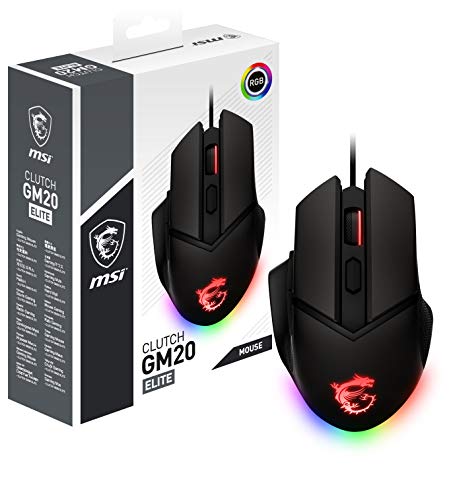
MSI Clutch GM20 Elite Gaming Mouse, 6400 – Features & Prices in Saudi Arabia :
MSI Clutch GM20 Elite Gaming Mouse, 6400 DPI, 20M+ Clicks OMRON Switch, Optical Sensor, Adjustable Weights, Ergonomic Right Hand Design, RGB Mystic Light
Brand
MSI
Item model number
GM20Elite
Hardware Platform
PC
Item Weight
4.8 ounces
Product Dimensions
7.8 x 5.2 x 2.1 inches
Item Dimensions LxWxH
7.8 x 5.2 x 2.1 inches
Manufacturer
MSI COMPUTER
ASIN
B08LG4LKKQ
Country of Origin
China
Date First Available
October 19, 2020
Test video – MSI Clutch GM20 Elite Gaming Mouse, 6400 :
Product highlights :
Questions & Answers – MSI Clutch GM20 Elite Gaming Mouse, 6400 :
Technical specifications – MSI Clutch GM20 Elite Gaming Mouse, 6400 :
Brand
MSI
Connectivity Technology
USB
Special Feature
Ergonomic Design
Movement Detection Technology
Optical
Number of Buttons
6
Purchase advice :
-
Warranty :
Check the duration of the warranty and also the faults and defects it covers. Is it complete or limited? and What is included in the warranty (parts, repairs or both)?
-
Shipping :
Is delivery offered? And how long does it take to get delivered (Delivery time)
-
Proof of purchase :
Does the shop give you an invoice ?
-
After-sales service :
Do they have an after-sales service to have information about the installation or operation (instructions for use). Also in case of problem, it is the seller who takes charge or you must contact the manufacturer or supplier yourself.
_____________________________

E. I (verified owner) –
Why cant more brands make their wireless mice this lightweight? – This mouse is very pleasant to work with or play games with as the lack of a cable and the fact that it is extremely light make it very maneuverable. The included stand makes it very convenient to just set the mouse aside for a few hours to charge as well.
C. L (verified owner) –
Kinda bulky – The mouse is great. Looks cool and works like a charm. The only downside is I have small hands, maybe cause I’m a woman so compared to men, they’d be a bit smaller, so the mouse is really big and bulky so it’s sometimes hard to use all the controls when playing a game that needs quick reflexes. It’s very lightweight as stated in the description so I love that as well as long battery life. Just wish it was more user friendly for most if not all gamer hand sizes. I’ll make it work somehow but just to let anyone out there that have fairly small hands that is may be an issue
S. K (verified owner) –
good mouse – recommended
I. D (verified owner) –
Cheap – Product completely stopped working after 6 months. For a month leading up to the product failing, the mouse had issues where it would frequently disconnect and reconnect several times an hour. This in itself was annoying while trying to do simple tasks like sending an email or while trying to play games. I would avoid this product if you’re looking for something more long-term.
A. R (verified owner) –
Confirmed works with dragon center – There are a few reviews out there saying this does not work with Mystic Light via Dragon Center. As of today 8-13-22, it does indeed work. I plugged in the mouse and used Dragon Center to update the firmware. I did not appear on my Mystic light section right away. So I unplugged the mouse and plugged it right back in and everything popped up. It is worth mentioning you do not get to pick from the full RGB spectrum. Dragon Center gives you 8 color choices. But you can go into full custom and set the scroll wheel, the dragon logo and each of the 5 led lights that make the strip at the base. The annoying thing is that white is inconsistent, some taking on more of a blue hue. So you have to tweak each one individually to get a consistent color.
C. J (verified owner) –
good – i like this mouse alot but for its price its not really worth it. the mouse feels kind of weird when holding it and is uncomfortable. It feels like its for people with smaller hands then mine. there isnt any grip or texture on this mouse, and mine didnt come with a manual to change DPI, it goes by colors for example purple is 800 DPi. the battery life is amazing last super super long. the charging dock was hard at first to get the wire into it but eventually you get the hang of it. some aim issues i have with it is that the sides go inward to much and my thumb rests on the desk so when i aim the the side it drags my thumb and messes up my aim. the way the mouse is shapped isnt my style its to long.
E. I (verified owner) –
Why cant more brands make their wireless mice this lightweight? – This mouse is very pleasant to work with or play games with as the lack of a cable and the fact that it is extremely light make it very maneuverable. The included stand makes it very convenient to just set the mouse aside for a few hours to charge as well.
O. I (verified owner) –
Pretty Decent – Quality of the mouse felt pretty good. My only huge gripe was where my pink rested; it felt a bit squished or like it had nowhere to go. The sensor is not as impressive as others currently on the market but it isn’t bad and 6400 DPI should be more than enough for most people, mice boasting over 30k DPI feels like kind of a gimmick.
C. J (verified owner) –
good – i like this mouse alot but for its price its not really worth it. the mouse feels kind of weird when holding it and is uncomfortable. It feels like its for people with smaller hands then mine. there isnt any grip or texture on this mouse, and mine didnt come with a manual to change DPI, it goes by colors for example purple is 800 DPi. the battery life is amazing last super super long. the charging dock was hard at first to get the wire into it but eventually you get the hang of it. some aim issues i have with it is that the sides go inward to much and my thumb rests on the desk so when i aim the the side it drags my thumb and messes up my aim. the way the mouse is shapped isnt my style its to long.
A. R (verified owner) –
Confirmed works with dragon center – There are a few reviews out there saying this does not work with Mystic Light via Dragon Center. As of today 8-13-22, it does indeed work. I plugged in the mouse and used Dragon Center to update the firmware. I did not appear on my Mystic light section right away. So I unplugged the mouse and plugged it right back in and everything popped up. It is worth mentioning you do not get to pick from the full RGB spectrum. Dragon Center gives you 8 color choices. But you can go into full custom and set the scroll wheel, the dragon logo and each of the 5 led lights that make the strip at the base. The annoying thing is that white is inconsistent, some taking on more of a blue hue. So you have to tweak each one individually to get a consistent color.
C. L (verified owner) –
Kinda bulky – The mouse is great. Looks cool and works like a charm. The only downside is I have small hands, maybe cause I’m a woman so compared to men, they’d be a bit smaller, so the mouse is really big and bulky so it’s sometimes hard to use all the controls when playing a game that needs quick reflexes. It’s very lightweight as stated in the description so I love that as well as long battery life. Just wish it was more user friendly for most if not all gamer hand sizes. I’ll make it work somehow but just to let anyone out there that have fairly small hands that is may be an issue
D. H (verified owner) –
Great mouse – I use this mouse to play diablo 3 and similar games and it works great.
I. D (verified owner) –
Cheap – Product completely stopped working after 6 months. For a month leading up to the product failing, the mouse had issues where it would frequently disconnect and reconnect several times an hour. This in itself was annoying while trying to do simple tasks like sending an email or while trying to play games. I would avoid this product if you’re looking for something more long-term.
D. H (verified owner) –
Great mouse – I use this mouse to play diablo 3 and similar games and it works great.
S. K (verified owner) –
good mouse – recommended
O. I (verified owner) –
Pretty Decent – Quality of the mouse felt pretty good. My only huge gripe was where my pink rested; it felt a bit squished or like it had nowhere to go. The sensor is not as impressive as others currently on the market but it isn’t bad and 6400 DPI should be more than enough for most people, mice boasting over 30k DPI feels like kind of a gimmick.