Mcbazel Wireless USB 2.0 Gaming Receiver Adapter – Features & Prices in Saudi Arabia :
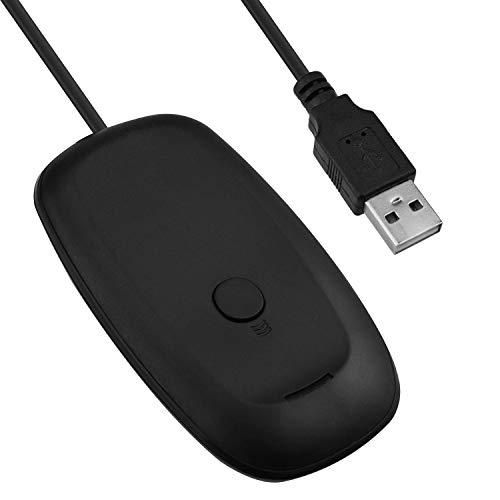
Mcbazel Wireless USB 2.0 Gaming Receiver Adapter for Microsoft Xbox 360 Desktop Pc Laptop Gaming – Black
Product Dimensions
4.53 x 3.54 x 1.1 inches
Item Weight
2.82 ounces
ASIN
B076GZFLR3
Is Discontinued By Manufacturer
No
Date First Available
August 24, 2020
Manufacturer
Mcbazel
Country of Origin
China
Test video – Mcbazel Wireless USB 2.0 Gaming Receiver Adapter :
Product highlights :
Will work with future Xbox 360 Wireless Accessories. Please scan the QR code on the package, you can find the driver to download ( if it is not found from your PC ), set up video guide and other necessary information for reference.
Provides up to a 30-foot range for complete wireless freedom.
Use up to four Wireless Controllers and four Wireless Headsets simultaneously with one Wireless Gaming Receiver.
Easily integrates with PC gaming scenarios and utilizes the same binding technology as Xbox 360.
Provides a great value by eliminating the need for additional accessories for Windows-based gaming at an attractive price point. NOTE : Made by third party, NOT the official product.
➕ What is the price of Mcbazel Wireless USB 2.0 Gaming Receiver Adapter in Saudi Arabia ?
The price of Mcbazel Wireless USB 2.0 Gaming Receiver Adapter in-store is 140 SAR VAT.
➕ When Mcbazel Wireless USB 2.0 Gaming Receiver Adapter was released ?
The release date was August 24, 2020.
➕ What is the price of Mcbazel Wireless USB 2.0 Gaming Receiver Adapter cheap used ?
The price of Mcbazel Wireless USB 2.0 Gaming Receiver Adapter used is 90 SAR VAT.
➕ What are the main characteristics of Mcbazel Wireless USB 2.0 Gaming Receiver Adapter ?
Special specifications :
Will work with future Xbox 360 Wireless Accessories. Please scan the QR code on the package, you can find the driver to download ( if it is not found from your PC ), set up video guide and other necessary information for reference.
➕ Is it interesting to buy this product ?
The best people who can answer you are customers who have already bought and tested this product (See Customer Reviews). This product is rated 4 / 5 on Amazon.
➕ Where to buy Mcbazel Wireless USB 2.0 Gaming Receiver Adapter in Saudi Arabia ?
Check the duration of the warranty and also the faults and defects it covers. Is it complete or limited? and What is included in the warranty (parts, repairs or both)?
Shipping :
Is delivery offered? And how long does it take to get delivered (Delivery time)
Proof of purchase :
Does the shop give you an invoice ?
After-sales service :
Do they have an after-sales service to have information about the installation or operation (instructions for use). Also in case of problem, it is the seller who takes charge or you must contact the manufacturer or supplier yourself.
_____________________________
16 reviews for Mcbazel Wireless USB 2.0 Gaming Receiver Adapter
Rated 4 out of 5
T. B (verified owner)–
Okay product that’s much cheaper than the Microsoft version – The original product review is below, but since that review I was able to replace the product and the second iteration works quite a bit better.. There is still some general wonkiness with not pairing, so I wouldn’t want to really rely on this product much, but it *does* work with my Steam Link and Windows 10.
Rated 3 out of 5
S. S (verified owner)–
Works but barely – I bought this to use with CloneHero and a Xbox 360 Guitar, I was able to set it up and get it working despite the awful driver situation(explained by other reviewers here). Once that was done it does work but it doesn’t work well. The range is just terrible and is prone to have frequent disconnects, it makes using it very frustrating.
Rated 5 out of 5
K. K (verified owner)–
Works, but the instructions were not 100% correct – In the video that shows the setup process, it says that you should first sync the devices and then install the drivers. In reality, you should first install the drivers and then sync the devices. Anyway, the product works as expected. Thumbs up from me!
Rated 2 out of 5
T. M (verified owner)–
Sketchy Driver Install that does not work – The product arrived not working after plugging it in, it needed a driver to be installed. To install the driver I had to scan a QR code the size of my finger nail. After a minute of trying to scan it I got a link to a google drive of the driver. It is not even a installer, instead they link a YouTube video showing where to drop the files. It still did not work after that.
Rated 5 out of 5
D. Z (verified owner)–
Works great. Had to set up the drivers, but that was easy enough. – Like the title says, you do need to activate the Xbox 360 peripherals from device manager in your PC. You have to go through the menus and select the Xbox 360 wireless adapter and activate it. Once that’s done, it works like a charm.
Rated 3 out of 5
S. S (verified owner)–
Works but barely – I bought this to use with CloneHero and a Xbox 360 Guitar, I was able to set it up and get it working despite the awful driver situation(explained by other reviewers here). Once that was done it does work but it doesn’t work well. The range is just terrible and is prone to have frequent disconnects, it makes using it very frustrating.
Rated 5 out of 5
F. L (verified owner)–
Stick it in – Ya feelin it now mr. krabs?
Rated 2 out of 5
T. M (verified owner)–
Sketchy Driver Install that does not work – The product arrived not working after plugging it in, it needed a driver to be installed. To install the driver I had to scan a QR code the size of my finger nail. After a minute of trying to scan it I got a link to a google drive of the driver. It is not even a installer, instead they link a YouTube video showing where to drop the files. It still did not work after that.
Rated 5 out of 5
T. G (verified owner)–
real easy to set up – got to relive my childhood playing guitar hero on pc, real easy to setup, can find a tutorial in the comments
Rated 5 out of 5
S. N (verified owner)–
Works great! – I bought this to use my guitar hero controller on my pc to play clone hero, and it works as expected and I have no real complaints. I would definitely watch the video because you do have to install/update a driver to have this adapter work like it’s suppose to. I’ve had it for almost a year/or longer at this point in time and it has yet to let me down. I use it at least 3 times a week and it’s easy to move where I want to with the length of the cord.
Rated 5 out of 5
K. K (verified owner)–
Works, but the instructions were not 100% correct – In the video that shows the setup process, it says that you should first sync the devices and then install the drivers. In reality, you should first install the drivers and then sync the devices. Anyway, the product works as expected. Thumbs up from me!
Rated 5 out of 5
S. N (verified owner)–
Works great! – I bought this to use my guitar hero controller on my pc to play clone hero, and it works as expected and I have no real complaints. I would definitely watch the video because you do have to install/update a driver to have this adapter work like it’s suppose to. I’ve had it for almost a year/or longer at this point in time and it has yet to let me down. I use it at least 3 times a week and it’s easy to move where I want to with the length of the cord.
Rated 4 out of 5
T. B (verified owner)–
Okay product that’s much cheaper than the Microsoft version – The original product review is below, but since that review I was able to replace the product and the second iteration works quite a bit better.. There is still some general wonkiness with not pairing, so I wouldn’t want to really rely on this product much, but it *does* work with my Steam Link and Windows 10.
Rated 5 out of 5
D. Z (verified owner)–
Works great. Had to set up the drivers, but that was easy enough. – Like the title says, you do need to activate the Xbox 360 peripherals from device manager in your PC. You have to go through the menus and select the Xbox 360 wireless adapter and activate it. Once that’s done, it works like a charm.
Rated 5 out of 5
F. L (verified owner)–
Stick it in – Ya feelin it now mr. krabs?
Rated 5 out of 5
T. G (verified owner)–
real easy to set up – got to relive my childhood playing guitar hero on pc, real easy to setup, can find a tutorial in the comments

T. B (verified owner) –
Okay product that’s much cheaper than the Microsoft version – The original product review is below, but since that review I was able to replace the product and the second iteration works quite a bit better.. There is still some general wonkiness with not pairing, so I wouldn’t want to really rely on this product much, but it *does* work with my Steam Link and Windows 10.
S. S (verified owner) –
Works but barely – I bought this to use with CloneHero and a Xbox 360 Guitar, I was able to set it up and get it working despite the awful driver situation(explained by other reviewers here). Once that was done it does work but it doesn’t work well. The range is just terrible and is prone to have frequent disconnects, it makes using it very frustrating.
K. K (verified owner) –
Works, but the instructions were not 100% correct – In the video that shows the setup process, it says that you should first sync the devices and then install the drivers. In reality, you should first install the drivers and then sync the devices. Anyway, the product works as expected. Thumbs up from me!
T. M (verified owner) –
Sketchy Driver Install that does not work – The product arrived not working after plugging it in, it needed a driver to be installed. To install the driver I had to scan a QR code the size of my finger nail. After a minute of trying to scan it I got a link to a google drive of the driver. It is not even a installer, instead they link a YouTube video showing where to drop the files. It still did not work after that.
D. Z (verified owner) –
Works great. Had to set up the drivers, but that was easy enough. – Like the title says, you do need to activate the Xbox 360 peripherals from device manager in your PC. You have to go through the menus and select the Xbox 360 wireless adapter and activate it. Once that’s done, it works like a charm.
S. S (verified owner) –
Works but barely – I bought this to use with CloneHero and a Xbox 360 Guitar, I was able to set it up and get it working despite the awful driver situation(explained by other reviewers here). Once that was done it does work but it doesn’t work well. The range is just terrible and is prone to have frequent disconnects, it makes using it very frustrating.
F. L (verified owner) –
Stick it in – Ya feelin it now mr. krabs?
T. M (verified owner) –
Sketchy Driver Install that does not work – The product arrived not working after plugging it in, it needed a driver to be installed. To install the driver I had to scan a QR code the size of my finger nail. After a minute of trying to scan it I got a link to a google drive of the driver. It is not even a installer, instead they link a YouTube video showing where to drop the files. It still did not work after that.
T. G (verified owner) –
real easy to set up – got to relive my childhood playing guitar hero on pc, real easy to setup, can find a tutorial in the comments
S. N (verified owner) –
Works great! – I bought this to use my guitar hero controller on my pc to play clone hero, and it works as expected and I have no real complaints. I would definitely watch the video because you do have to install/update a driver to have this adapter work like it’s suppose to. I’ve had it for almost a year/or longer at this point in time and it has yet to let me down. I use it at least 3 times a week and it’s easy to move where I want to with the length of the cord.
K. K (verified owner) –
Works, but the instructions were not 100% correct – In the video that shows the setup process, it says that you should first sync the devices and then install the drivers. In reality, you should first install the drivers and then sync the devices. Anyway, the product works as expected. Thumbs up from me!
S. N (verified owner) –
Works great! – I bought this to use my guitar hero controller on my pc to play clone hero, and it works as expected and I have no real complaints. I would definitely watch the video because you do have to install/update a driver to have this adapter work like it’s suppose to. I’ve had it for almost a year/or longer at this point in time and it has yet to let me down. I use it at least 3 times a week and it’s easy to move where I want to with the length of the cord.
T. B (verified owner) –
Okay product that’s much cheaper than the Microsoft version – The original product review is below, but since that review I was able to replace the product and the second iteration works quite a bit better.. There is still some general wonkiness with not pairing, so I wouldn’t want to really rely on this product much, but it *does* work with my Steam Link and Windows 10.
D. Z (verified owner) –
Works great. Had to set up the drivers, but that was easy enough. – Like the title says, you do need to activate the Xbox 360 peripherals from device manager in your PC. You have to go through the menus and select the Xbox 360 wireless adapter and activate it. Once that’s done, it works like a charm.
F. L (verified owner) –
Stick it in – Ya feelin it now mr. krabs?
T. G (verified owner) –
real easy to set up – got to relive my childhood playing guitar hero on pc, real easy to setup, can find a tutorial in the comments