KLIM Ace – Rechargeable Wireless Gaming Mouse – Features & Prices in Saudi Arabia :
KLIM Ace – Rechargeable Wireless Gaming Mouse RGB + New 2022 + High-Precision Sensor & Breathtaking RGB Effect + 8 Customizable Buttons + Ambidextrous + Wired and Wireless Mouse for PC Mac PS4 PS5
Product Dimensions
4.8 x 2.48 x 1.61 inches
Item Weight
3.52 ounces
ASIN
B09SM4HGXY
Batteries
1 Lithium Ion batteries required. (included)
Date First Available
February 16, 2022
Manufacturer
KLIM
Country of Origin
China
Test video – KLIM Ace – Rechargeable Wireless Gaming Mouse :
Product highlights :
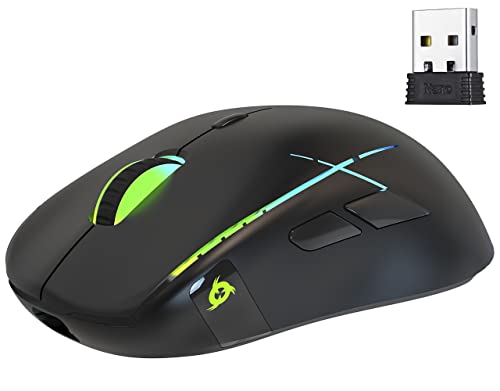
✅ TOTAL FREEDOM TO DOMINATE THE GAME. Enjoy the advantages of a wireless mouse and stop worrying about cables. The KLIM Ace features excellent reaction time and responsiveness, comparable to any high-end wired computer mouse. Your movements are always perfectly tracked thanks to its precise sensor, so you can dominate the game!
✅ PLAY WITH STYLE. This PC mouse (also compatible with PS4/PS5) is not only a joy to play with, it’s also a joy to behold. Its bright X-shaped RGB lines surround the top of the mouse giving it an aggressive style! Not to mention the two shiny logos on each side, which is something never seen before on a gaming wireless mouse. Last but not least, you can customize the dpi, polling rate, effects and colours using our dedicated drivers or directly from the mouse by simple buttons combinations.
✅ TRULY AMBIDEXTROUS. Most of the gaming mice are designed exclusively for right-handers even if some of them claim to have an ambidextrous shape. It’s not the case with the KLIM Ace, since the start of its conception, we wanted to make a peripheral that could be a great left handed gaming mouse. That’s why this RGB gaming mouse with side buttons includes two buttons on the left (Forward/Back), and two on the right (Vol+/Vol-). It’s fully customizable, making it perfect for everyone!
✅ EXTREMELY DURABLE + A RISK-FREE PURCHASE. Each button on this ambidextrous mouse has been tested to withstand more than 20 million clicks. Furthermore, its durable coating provides increased resistance against wear and tear. If that weren’t enough, this product is covered by an extra 5 years warranty, which is a testament to the quality of the mouse. And if you encounter any issue, our native English customer service answers within 24 hours, even on week-ends! It’s a 100% risk free purchase.
✅ BUILT-IN BATTERY + WIRED MODE. Unlike other models using disposable batteries, we have included a long-lasting built-in battery that can be charged over and over again with minimal degradation. This means you will not need to spend a dime in batteries and can be sure to always have the mouse ready for action. Its long 175 cm charging cable can be plugged in to a regular socket for fast charge, or connected directly to your PC to keep using it while it recharges.
➕ What is the price of KLIM Ace - Rechargeable Wireless Gaming Mouse in Saudi Arabia ?
The price of KLIM Ace – Rechargeable Wireless Gaming Mouse in-store is 80 SAR VAT.
➕ When KLIM Ace - Rechargeable Wireless Gaming Mouse was released ?
The release date was February 16, 2022.
➕ What is the price of KLIM Ace - Rechargeable Wireless Gaming Mouse cheap used ?
The price of KLIM Ace – Rechargeable Wireless Gaming Mouse used is 50 SAR VAT.
➕ What are the main characteristics of KLIM Ace - Rechargeable Wireless Gaming Mouse ?
Special specifications :
✅ TOTAL FREEDOM TO DOMINATE THE GAME. Enjoy the advantages of a wireless mouse and stop worrying about cables. The KLIM Ace features excellent reaction time and responsiveness, comparable to any high-end wired computer mouse. Your movements are always perfectly tracked thanks to its precise sensor, so you can dominate the game!
➕ Is it interesting to buy this product ?
The best people who can answer you are customers who have already bought and tested this product (See Customer Reviews). This product is rated 4.3 / 5 on Amazon.
➕ Where to buy KLIM Ace - Rechargeable Wireless Gaming Mouse in Saudi Arabia ?
Check the duration of the warranty and also the faults and defects it covers. Is it complete or limited? and What is included in the warranty (parts, repairs or both)?
Shipping :
Is delivery offered? And how long does it take to get delivered (Delivery time)
Proof of purchase :
Does the shop give you an invoice ?
After-sales service :
Do they have an after-sales service to have information about the installation or operation (instructions for use). Also in case of problem, it is the seller who takes charge or you must contact the manufacturer or supplier yourself.
_____________________________
10 reviews for KLIM Ace – Rechargeable Wireless Gaming Mouse
Rated 4 out of 5
J. E (verified owner)–
Customizable, wireless gaming mouse on a budget – The KLIM Ace isn’t the fanciest wireless gaming mouse ever, but it doesn’t need to be. KLIM has managed make the Ace feature rich while keeping it in the realm of being a $30 mouse. So far, of the five gaming mice that I own, this is about the second most comfortable. I find this impressive since I haven’t been a fan of ambidextrous mice. My current favorite costs more than twice as much, but I found the KLIM Ace to be more comfortable than a mouse that is five times more expensive. Comfort is subjective, so take it for what it’s worth. It’s not the lightest wireless mouse, but at this price, you’re not likely to find lightweight, durable, and wireless all in the same package. It’s the middle mouse in the line-up in the photos I took, so you can see it’s relative shape and size in comparison. From left to right: the Logitech MX518, the Logitech G5, the Klim Ace, the Razer Viper v2, and the Glorious Model D Wireless.
Rated 4 out of 5
K. Z (verified owner)–
good, cheap mouse – I chose this KLIM Ace – Rechargeable Wireless Gaming Mouse to use with a laptop that I use on occasion since the trackpad slows me down. The RGB lighting is good, the sensor is pretty responsive, and it has a rechargeable battery via usb-c which is nice. Easy setup with the receiver as well.
Rated 5 out of 5
P. Z (verified owner)–
Like it! – I love this mouse! I didn’t have problems with it keeping charges like som reviewers which was grate. I usually plug it in to charge when I turn my computer off and it will charge it even when the tower isn’t working so I charge it on a daily basis. I also have my old wireless mouse for a backup but haven’t had to use it since I haven’t had a problem with the charge. Also the way my computer is setup even if it were to die on me I could still use it in hardwire mode.
Rated 4 out of 5
K. Z (verified owner)–
good, cheap mouse – I chose this KLIM Ace – Rechargeable Wireless Gaming Mouse to use with a laptop that I use on occasion since the trackpad slows me down. The RGB lighting is good, the sensor is pretty responsive, and it has a rechargeable battery via usb-c which is nice. Easy setup with the receiver as well.
Rated 4 out of 5
I. N (verified owner)–
Works well, lots of buttons – This is a wireless mouse that features left and right, side buttons so you can use the mouse right-handed and left-handed.
Rated 5 out of 5
P. Z (verified owner)–
Like it! – I love this mouse! I didn’t have problems with it keeping charges like som reviewers which was grate. I usually plug it in to charge when I turn my computer off and it will charge it even when the tower isn’t working so I charge it on a daily basis. I also have my old wireless mouse for a backup but haven’t had to use it since I haven’t had a problem with the charge. Also the way my computer is setup even if it were to die on me I could still use it in hardwire mode.
Rated 4 out of 5
I. N (verified owner)–
Works well, lots of buttons – This is a wireless mouse that features left and right, side buttons so you can use the mouse right-handed and left-handed.
Rated 4 out of 5
O. E (verified owner)–
$20 wireless ambidextrous mouse – A few years ago I bought their previous product the $30 Klim AIM. That mouse replaced my $120 Logitech G903 which was left-handed perfection, but only lasted a year so I have a similar low end and high end item I can compare this to.
Rated 4 out of 5
O. E (verified owner)–
$20 wireless ambidextrous mouse – A few years ago I bought their previous product the $30 Klim AIM. That mouse replaced my $120 Logitech G903 which was left-handed perfection, but only lasted a year so I have a similar low end and high end item I can compare this to.
Rated 4 out of 5
J. E (verified owner)–
Customizable, wireless gaming mouse on a budget – The KLIM Ace isn’t the fanciest wireless gaming mouse ever, but it doesn’t need to be. KLIM has managed make the Ace feature rich while keeping it in the realm of being a $30 mouse. So far, of the five gaming mice that I own, this is about the second most comfortable. I find this impressive since I haven’t been a fan of ambidextrous mice. My current favorite costs more than twice as much, but I found the KLIM Ace to be more comfortable than a mouse that is five times more expensive. Comfort is subjective, so take it for what it’s worth. It’s not the lightest wireless mouse, but at this price, you’re not likely to find lightweight, durable, and wireless all in the same package. It’s the middle mouse in the line-up in the photos I took, so you can see it’s relative shape and size in comparison. From left to right: the Logitech MX518, the Logitech G5, the Klim Ace, the Razer Viper v2, and the Glorious Model D Wireless.


J. E (verified owner) –
Customizable, wireless gaming mouse on a budget – The KLIM Ace isn’t the fanciest wireless gaming mouse ever, but it doesn’t need to be. KLIM has managed make the Ace feature rich while keeping it in the realm of being a $30 mouse. So far, of the five gaming mice that I own, this is about the second most comfortable. I find this impressive since I haven’t been a fan of ambidextrous mice. My current favorite costs more than twice as much, but I found the KLIM Ace to be more comfortable than a mouse that is five times more expensive. Comfort is subjective, so take it for what it’s worth. It’s not the lightest wireless mouse, but at this price, you’re not likely to find lightweight, durable, and wireless all in the same package. It’s the middle mouse in the line-up in the photos I took, so you can see it’s relative shape and size in comparison. From left to right: the Logitech MX518, the Logitech G5, the Klim Ace, the Razer Viper v2, and the Glorious Model D Wireless.
K. Z (verified owner) –
good, cheap mouse – I chose this KLIM Ace – Rechargeable Wireless Gaming Mouse to use with a laptop that I use on occasion since the trackpad slows me down. The RGB lighting is good, the sensor is pretty responsive, and it has a rechargeable battery via usb-c which is nice. Easy setup with the receiver as well.
P. Z (verified owner) –
Like it! – I love this mouse! I didn’t have problems with it keeping charges like som reviewers which was grate. I usually plug it in to charge when I turn my computer off and it will charge it even when the tower isn’t working so I charge it on a daily basis. I also have my old wireless mouse for a backup but haven’t had to use it since I haven’t had a problem with the charge. Also the way my computer is setup even if it were to die on me I could still use it in hardwire mode.
K. Z (verified owner) –
good, cheap mouse – I chose this KLIM Ace – Rechargeable Wireless Gaming Mouse to use with a laptop that I use on occasion since the trackpad slows me down. The RGB lighting is good, the sensor is pretty responsive, and it has a rechargeable battery via usb-c which is nice. Easy setup with the receiver as well.
I. N (verified owner) –
Works well, lots of buttons – This is a wireless mouse that features left and right, side buttons so you can use the mouse right-handed and left-handed.
P. Z (verified owner) –
Like it! – I love this mouse! I didn’t have problems with it keeping charges like som reviewers which was grate. I usually plug it in to charge when I turn my computer off and it will charge it even when the tower isn’t working so I charge it on a daily basis. I also have my old wireless mouse for a backup but haven’t had to use it since I haven’t had a problem with the charge. Also the way my computer is setup even if it were to die on me I could still use it in hardwire mode.
I. N (verified owner) –
Works well, lots of buttons – This is a wireless mouse that features left and right, side buttons so you can use the mouse right-handed and left-handed.
O. E (verified owner) –
$20 wireless ambidextrous mouse – A few years ago I bought their previous product the $30 Klim AIM. That mouse replaced my $120 Logitech G903 which was left-handed perfection, but only lasted a year so I have a similar low end and high end item I can compare this to.
O. E (verified owner) –
$20 wireless ambidextrous mouse – A few years ago I bought their previous product the $30 Klim AIM. That mouse replaced my $120 Logitech G903 which was left-handed perfection, but only lasted a year so I have a similar low end and high end item I can compare this to.
J. E (verified owner) –
Customizable, wireless gaming mouse on a budget – The KLIM Ace isn’t the fanciest wireless gaming mouse ever, but it doesn’t need to be. KLIM has managed make the Ace feature rich while keeping it in the realm of being a $30 mouse. So far, of the five gaming mice that I own, this is about the second most comfortable. I find this impressive since I haven’t been a fan of ambidextrous mice. My current favorite costs more than twice as much, but I found the KLIM Ace to be more comfortable than a mouse that is five times more expensive. Comfort is subjective, so take it for what it’s worth. It’s not the lightest wireless mouse, but at this price, you’re not likely to find lightweight, durable, and wireless all in the same package. It’s the middle mouse in the line-up in the photos I took, so you can see it’s relative shape and size in comparison. From left to right: the Logitech MX518, the Logitech G5, the Klim Ace, the Razer Viper v2, and the Glorious Model D Wireless.