IFYOO Yao L1 PRO Mobile Game Controller – Features & Prices in Saudi Arabia :
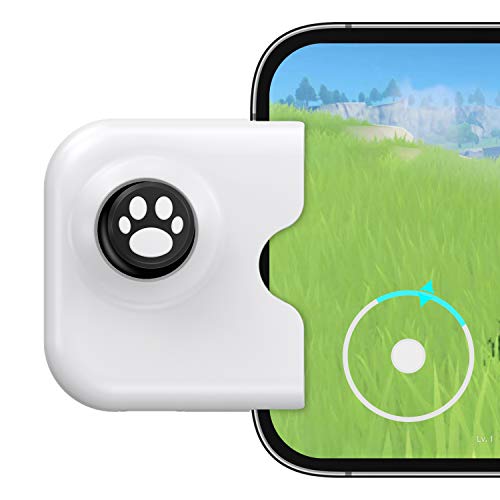
IFYOO Yao L1 PRO Mobile Game Controller Joystick for iPhone (iOS 13.4 or Later, For iOS Mobile Games), Gaming Gamepad Compatible with PUBGG Mobile, Call of Duty Mobile(CODM), Wild Rift, Genshin Impact
Package Dimensions
4.76 x 3.03 x 1.61 inches
Item Weight
1.41 ounces
ASIN
B08PG4XCQM
Item model number
Yao-L1 PRO
OS
IOS 13.4 or later
Connectivity technologies
USB
Special Features
Wireless, Ergonomic
Other display features
Wireless
Colour
White – For iPhone
Manufacturer
IFYOO
Date First Available
December 2, 2020
Test video – IFYOO Yao L1 PRO Mobile Game Controller :
Product highlights :
Move like A Boss with Joystick: Compatible with iPhone 13 Pro Max, 13 Pro, 13, 13 mini, iPhone 12 Pro Max, 12 Pro, 12, 12 mini, 11 Pro Max, 11 Pro, 11, Xs Max, Xs, X, 8 Plus, 8, 7 Plus, 7 Plus, 7 (iOS 13.4 or Later)
Pure Physical Control: The YAO Mobile Joystick features 12bit ADC Module, brings back the familiar physical movement to mobile games. offers gamer percise and fluid control over in-game character, complex and trick moves can be achieved easily. Textured Joystick for more comfort and grip
Plug and Play: The YAO Mobile Joystick Compact and lightweight, fits in your pocket. No baterry inside, low power consumption. For the best gaming experience, it is highly recommended to remove your phone case before plug in the joystick.
Charging while Playing: The joystick come with a USB-C charging port. No need to worry about low battery during Ganking again. Just plug in your charging cable and enjoy the long gaming sessions.
Perfect for games with on screen joystick control like Wild Rift, Genshin Impact, COD mobile,Mobile Legends, Arena of Valor, FIFA, NAB 2K. Worry-free Sales Service: 1 year Warranty. Please feel free to contact us at any time.
Questions & Answers – IFYOO Yao L1 PRO Mobile Game Controller :
➕ What is the price of IFYOO Yao L1 PRO Mobile Game Controller in Saudi Arabia ?
The price of IFYOO Yao L1 PRO Mobile Game Controller in-store is 60 SAR VAT.
➕ When IFYOO Yao L1 PRO Mobile Game Controller was released ?
The release date was December 2, 2020.
➕ What is the price of IFYOO Yao L1 PRO Mobile Game Controller cheap used ?
The price of IFYOO Yao L1 PRO Mobile Game Controller used is 40 SAR VAT.
➕ What are the main characteristics of IFYOO Yao L1 PRO Mobile Game Controller ?
Special specifications :
Move like A Boss with Joystick: Compatible with iPhone 13 Pro Max, 13 Pro, 13, 13 mini, iPhone 12 Pro Max, 12 Pro, 12, 12 mini, 11 Pro Max, 11 Pro, 11, Xs Max, Xs, X, 8 Plus, 8, 7 Plus, 7 Plus, 7 (iOS 13.4 or Later)
Pure Physical Control: The YAO Mobile Joystick features 12bit ADC Module, brings back the familiar physical movement to mobile games. offers gamer percise and fluid control over in-game character, complex and trick moves can be achieved easily. Textured Joystick for more comfort and grip
➕ Is it interesting to buy this product ?
The best people who can answer you are customers who have already bought and tested this product (See Customer Reviews). This product is rated 3.8 / 5 on Amazon.
➕ Where to buy IFYOO Yao L1 PRO Mobile Game Controller in Saudi Arabia ?
Technical specifications – IFYOO Yao L1 PRO Mobile Game Controller :
Brand
IFYOO
Compatible Devices
IOS
Controller Type
Joystick
Connectivity Technology
USB
Color
White – For iPhone
Purchase advice :
Warranty :
Check the duration of the warranty and also the faults and defects it covers. Is it complete or limited? and What is included in the warranty (parts, repairs or both)?
Shipping :
Is delivery offered? And how long does it take to get delivered (Delivery time)
Proof of purchase :
Does the shop give you an invoice ?
After-sales service :
Do they have an after-sales service to have information about the installation or operation (instructions for use). Also in case of problem, it is the seller who takes charge or you must contact the manufacturer or supplier yourself.
_____________________________
14 reviews for IFYOO Yao L1 PRO Mobile Game Controller
Rated 3 out of 5
K. B (verified owner)–
Works well READ THIS REVIEW – This works for Oceanhorn, doesnt work for minecraft, and I tried it in roblox some games work and some games dont. In roblox I played brookhaven didnt work, I played swordburst and that works perfectly, Vesteria works perfectly too, Dungeon quest doesnt work, jailbreak doesnt work, Zombie Attack works, bloxburg works. So basically the games that have a distinct area for your finger to be in order to move will not work with this joystick. I dont know if i explained it right, but yea. In order to test this out join roblox on your phone or any game in fact and check if the game has a “gray” circle on the left side of the screen. If it does then that is the “distinct” area im talking about and these games will not work with this joycon. The games where you drag around anywhere on the left side of the screen will work with this joycon. With the games Ive said that doesnt work, if you find a way to get rid of the on screen d pad then the joystick will work for that game. Hope this helped. Heres a recap… On screen d pad or on screen joystick games will not work, free hand left side movement with no visible distinct d pad or on screen joystick will work well with this product. For iphone all I did was connect on bluetooth and it starts working right away. They have a video on their youtube for further instructions on how to connect.
Rated 4 out of 5
K. F (verified owner)–
Stay stationary when playing – I was really excited to open this up as I’ve seen some others use it, but there’s always that little “not so great” about it thing.
Rated 4 out of 5
K. F (verified owner)–
Stay stationary when playing – I was really excited to open this up as I’ve seen some others use it, but there’s always that little “not so great” about it thing.
Rated 3 out of 5
F. S (verified owner)–
Inconsistent input and buggy – Tested on iPhone 12 Pro Max
Rated 4 out of 5
F. P (verified owner)–
Easy use – I liked that it’s easy to use and to travel with. I just didn’t like that you had to take off phone case to connect it. I personally don’t use much because it’s kind of hard to have a good grip when playing. But it’s nice once In a while. The button is nice, the controls are like if you were using your thumb on your phone. It sometimes lags on me when try to move forward so I have to push again in order to move forward but it’s not a big issue.
Rated 3 out of 5
P. K (verified owner)–
It okay – It doesn’t really work in most games and sometimes it doesmt even work but it’s okay
Rated 4 out of 5
B. D (verified owner)–
Pretty functional and cute – Ok so I love the joystick and everything and obviously have been using it for Genshin. It works fine I guess except sometimes, idk how to explain it, so at the beginning it works fine and I’m able to move my character like normal but then it glitches or something and it’s off and starts moving the screen instead of my character. So I always have to unplug it and go to the Bluetooth settings and click “forget this device” and then set it up all over again. And only sometimes it works. I mean I don’t really mind doing it but maybe for some people it’s a problem in case you wanna get this product. But maybe it might be my phone or something.
Rated 4 out of 5
T. Z (verified owner)–
Can play with a case after a quick DIY! – I know it says you should use it without a case but I’m an optimist and I like my phone being protected so I thought I’d see if I could make it work. I unscrewed the black rubber part of the case and then filed down the white plastic underneath so that it is flush with the bottom around the edges and just a little bit flatter near the lightning connector itself. I then put some white tac back in around the front and back of the case to make sure my phone didn’t wobble whilst playing. I use an iPhone 13 mini with a rather chunky UAG case and with these adjustments it works great. Whole thing took about 30mins to do. I’d recommend changing the white tac for some suguru if you’re feeling fancy as it’ll last better. I use this controller to play genshin and it works very well, you do sometimes have to move the phone around to reset the gyroscope so it controls movement not camera but it’s not a big deal.
Rated 3 out of 5
P. K (verified owner)–
It okay – It doesn’t really work in most games and sometimes it doesmt even work but it’s okay
Rated 4 out of 5
B. D (verified owner)–
Pretty functional and cute – Ok so I love the joystick and everything and obviously have been using it for Genshin. It works fine I guess except sometimes, idk how to explain it, so at the beginning it works fine and I’m able to move my character like normal but then it glitches or something and it’s off and starts moving the screen instead of my character. So I always have to unplug it and go to the Bluetooth settings and click “forget this device” and then set it up all over again. And only sometimes it works. I mean I don’t really mind doing it but maybe for some people it’s a problem in case you wanna get this product. But maybe it might be my phone or something.
Rated 4 out of 5
T. Z (verified owner)–
Can play with a case after a quick DIY! – I know it says you should use it without a case but I’m an optimist and I like my phone being protected so I thought I’d see if I could make it work. I unscrewed the black rubber part of the case and then filed down the white plastic underneath so that it is flush with the bottom around the edges and just a little bit flatter near the lightning connector itself. I then put some white tac back in around the front and back of the case to make sure my phone didn’t wobble whilst playing. I use an iPhone 13 mini with a rather chunky UAG case and with these adjustments it works great. Whole thing took about 30mins to do. I’d recommend changing the white tac for some suguru if you’re feeling fancy as it’ll last better. I use this controller to play genshin and it works very well, you do sometimes have to move the phone around to reset the gyroscope so it controls movement not camera but it’s not a big deal.
Rated 3 out of 5
F. S (verified owner)–
Inconsistent input and buggy – Tested on iPhone 12 Pro Max
Rated 3 out of 5
K. B (verified owner)–
Works well READ THIS REVIEW – This works for Oceanhorn, doesnt work for minecraft, and I tried it in roblox some games work and some games dont. In roblox I played brookhaven didnt work, I played swordburst and that works perfectly, Vesteria works perfectly too, Dungeon quest doesnt work, jailbreak doesnt work, Zombie Attack works, bloxburg works. So basically the games that have a distinct area for your finger to be in order to move will not work with this joystick. I dont know if i explained it right, but yea. In order to test this out join roblox on your phone or any game in fact and check if the game has a “gray” circle on the left side of the screen. If it does then that is the “distinct” area im talking about and these games will not work with this joycon. The games where you drag around anywhere on the left side of the screen will work with this joycon. With the games Ive said that doesnt work, if you find a way to get rid of the on screen d pad then the joystick will work for that game. Hope this helped. Heres a recap… On screen d pad or on screen joystick games will not work, free hand left side movement with no visible distinct d pad or on screen joystick will work well with this product. For iphone all I did was connect on bluetooth and it starts working right away. They have a video on their youtube for further instructions on how to connect.
Rated 4 out of 5
F. P (verified owner)–
Easy use – I liked that it’s easy to use and to travel with. I just didn’t like that you had to take off phone case to connect it. I personally don’t use much because it’s kind of hard to have a good grip when playing. But it’s nice once In a while. The button is nice, the controls are like if you were using your thumb on your phone. It sometimes lags on me when try to move forward so I have to push again in order to move forward but it’s not a big issue.

K. B (verified owner) –
Works well READ THIS REVIEW – This works for Oceanhorn, doesnt work for minecraft, and I tried it in roblox some games work and some games dont. In roblox I played brookhaven didnt work, I played swordburst and that works perfectly, Vesteria works perfectly too, Dungeon quest doesnt work, jailbreak doesnt work, Zombie Attack works, bloxburg works. So basically the games that have a distinct area for your finger to be in order to move will not work with this joystick. I dont know if i explained it right, but yea. In order to test this out join roblox on your phone or any game in fact and check if the game has a “gray” circle on the left side of the screen. If it does then that is the “distinct” area im talking about and these games will not work with this joycon. The games where you drag around anywhere on the left side of the screen will work with this joycon. With the games Ive said that doesnt work, if you find a way to get rid of the on screen d pad then the joystick will work for that game. Hope this helped. Heres a recap… On screen d pad or on screen joystick games will not work, free hand left side movement with no visible distinct d pad or on screen joystick will work well with this product. For iphone all I did was connect on bluetooth and it starts working right away. They have a video on their youtube for further instructions on how to connect.
K. F (verified owner) –
Stay stationary when playing – I was really excited to open this up as I’ve seen some others use it, but there’s always that little “not so great” about it thing.
K. F (verified owner) –
Stay stationary when playing – I was really excited to open this up as I’ve seen some others use it, but there’s always that little “not so great” about it thing.
F. S (verified owner) –
Inconsistent input and buggy – Tested on iPhone 12 Pro Max
F. P (verified owner) –
Easy use – I liked that it’s easy to use and to travel with. I just didn’t like that you had to take off phone case to connect it. I personally don’t use much because it’s kind of hard to have a good grip when playing. But it’s nice once In a while. The button is nice, the controls are like if you were using your thumb on your phone. It sometimes lags on me when try to move forward so I have to push again in order to move forward but it’s not a big issue.
P. K (verified owner) –
It okay – It doesn’t really work in most games and sometimes it doesmt even work but it’s okay
B. D (verified owner) –
Pretty functional and cute – Ok so I love the joystick and everything and obviously have been using it for Genshin. It works fine I guess except sometimes, idk how to explain it, so at the beginning it works fine and I’m able to move my character like normal but then it glitches or something and it’s off and starts moving the screen instead of my character. So I always have to unplug it and go to the Bluetooth settings and click “forget this device” and then set it up all over again. And only sometimes it works. I mean I don’t really mind doing it but maybe for some people it’s a problem in case you wanna get this product. But maybe it might be my phone or something.
T. Z (verified owner) –
Can play with a case after a quick DIY! – I know it says you should use it without a case but I’m an optimist and I like my phone being protected so I thought I’d see if I could make it work. I unscrewed the black rubber part of the case and then filed down the white plastic underneath so that it is flush with the bottom around the edges and just a little bit flatter near the lightning connector itself. I then put some white tac back in around the front and back of the case to make sure my phone didn’t wobble whilst playing. I use an iPhone 13 mini with a rather chunky UAG case and with these adjustments it works great. Whole thing took about 30mins to do. I’d recommend changing the white tac for some suguru if you’re feeling fancy as it’ll last better. I use this controller to play genshin and it works very well, you do sometimes have to move the phone around to reset the gyroscope so it controls movement not camera but it’s not a big deal.
P. K (verified owner) –
It okay – It doesn’t really work in most games and sometimes it doesmt even work but it’s okay
B. D (verified owner) –
Pretty functional and cute – Ok so I love the joystick and everything and obviously have been using it for Genshin. It works fine I guess except sometimes, idk how to explain it, so at the beginning it works fine and I’m able to move my character like normal but then it glitches or something and it’s off and starts moving the screen instead of my character. So I always have to unplug it and go to the Bluetooth settings and click “forget this device” and then set it up all over again. And only sometimes it works. I mean I don’t really mind doing it but maybe for some people it’s a problem in case you wanna get this product. But maybe it might be my phone or something.
T. Z (verified owner) –
Can play with a case after a quick DIY! – I know it says you should use it without a case but I’m an optimist and I like my phone being protected so I thought I’d see if I could make it work. I unscrewed the black rubber part of the case and then filed down the white plastic underneath so that it is flush with the bottom around the edges and just a little bit flatter near the lightning connector itself. I then put some white tac back in around the front and back of the case to make sure my phone didn’t wobble whilst playing. I use an iPhone 13 mini with a rather chunky UAG case and with these adjustments it works great. Whole thing took about 30mins to do. I’d recommend changing the white tac for some suguru if you’re feeling fancy as it’ll last better. I use this controller to play genshin and it works very well, you do sometimes have to move the phone around to reset the gyroscope so it controls movement not camera but it’s not a big deal.
F. S (verified owner) –
Inconsistent input and buggy – Tested on iPhone 12 Pro Max
K. B (verified owner) –
Works well READ THIS REVIEW – This works for Oceanhorn, doesnt work for minecraft, and I tried it in roblox some games work and some games dont. In roblox I played brookhaven didnt work, I played swordburst and that works perfectly, Vesteria works perfectly too, Dungeon quest doesnt work, jailbreak doesnt work, Zombie Attack works, bloxburg works. So basically the games that have a distinct area for your finger to be in order to move will not work with this joystick. I dont know if i explained it right, but yea. In order to test this out join roblox on your phone or any game in fact and check if the game has a “gray” circle on the left side of the screen. If it does then that is the “distinct” area im talking about and these games will not work with this joycon. The games where you drag around anywhere on the left side of the screen will work with this joycon. With the games Ive said that doesnt work, if you find a way to get rid of the on screen d pad then the joystick will work for that game. Hope this helped. Heres a recap… On screen d pad or on screen joystick games will not work, free hand left side movement with no visible distinct d pad or on screen joystick will work well with this product. For iphone all I did was connect on bluetooth and it starts working right away. They have a video on their youtube for further instructions on how to connect.
F. P (verified owner) –
Easy use – I liked that it’s easy to use and to travel with. I just didn’t like that you had to take off phone case to connect it. I personally don’t use much because it’s kind of hard to have a good grip when playing. But it’s nice once In a while. The button is nice, the controls are like if you were using your thumb on your phone. It sometimes lags on me when try to move forward so I have to push again in order to move forward but it’s not a big issue.