GCHT GAMING Switch Controller with Back Buttons, – Features & Prices in Saudi Arabia :
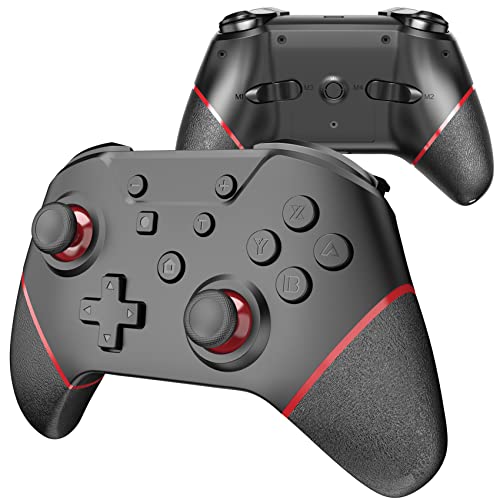
GCHT GAMING Switch Controller with Back Buttons, Switch Pro Controller for Switch/Lite/OLED Wireless Switch Controller with Wake Up, Turbo, Motion , Vibration and Compatible PC and Steam Mode (Red)
Package Dimensions
6.18 x 4.37 x 2.64 inches
Item Weight
9.9 ounces
Manufacturer
GCHT GAMING
ASIN
B09DF9WHWG
Date First Available
August 24, 2021
Test video – GCHT GAMING Switch Controller with Back Buttons, :
Product highlights :
Switch Pro Controller: This Switch Pro controller supports wireless and wired connection to the host and is fully compatible with Nintendo Switch/Switch lite/Switch OLED, including all the buttons of the original Switch. This SWITCH PRO controller can wake up the host quickly and is ergonomic.
High-performance Pro Controller: This Switch controller will help you achieve high-performance professional levels. The controller has motion control/turbo boost/custom rumble level/four additional Programming Buttons, PC wired connection mode is perfectly compatible with the STEAM platform. Adjustable turbo speeds are fast, medium, and slow. The vibration motor intensity can be set to a total of 100% -70% -30% -0% for the best comfort level to enjoy an immersive gaming experience.
Extended Battery: We only use the best batteries and this one comes with a large 500mAh battery. The battery will last 10 hours when fully charged. The controller will charge for two hours with the provided usb type-c cable.
Custom Design: The Switch controller has a custom non-slip handle to help with control. The textured dual joystick provides precise movement and excellent game feel. The improved controller has sensitive controls to ensure precise control in all.
Package Contents & Worry-Free:You can get (1* Switch Pro controller, 1*Type C cable 1*user Manuel,) Provide the best guarantee for consumers’ safety rights when shopping online. We guarantee 100% shopping experience with 12 months Worry-Free, contact us and we are happy to offer refund or replacement.
Questions & Answers – GCHT GAMING Switch Controller with Back Buttons, :
➕ What is the price of GCHT GAMING Switch Controller with Back Buttons, in Saudi Arabia ?
The price of GCHT GAMING Switch Controller with Back Buttons, in-store is 70 SAR VAT.
➕ When GCHT GAMING Switch Controller with Back Buttons, was released ?
The release date was August 24, 2021.
➕ What is the price of GCHT GAMING Switch Controller with Back Buttons, cheap used ?
The price of GCHT GAMING Switch Controller with Back Buttons, used is 50 SAR VAT.
➕ What are the main characteristics of GCHT GAMING Switch Controller with Back Buttons, ?
Special specifications :
Switch Pro Controller: This Switch Pro controller supports wireless and wired connection to the host and is fully compatible with Nintendo Switch/Switch lite/Switch OLED, including all the buttons of the original Switch. This SWITCH PRO controller can wake up the host quickly and is ergonomic.
➕ Is it interesting to buy this product ?
The best people who can answer you are customers who have already bought and tested this product (See Customer Reviews). This product is rated 4.2 / 5 on Amazon.
➕ Where to buy GCHT GAMING Switch Controller with Back Buttons, in Saudi Arabia ?
Technical specifications – GCHT GAMING Switch Controller with Back Buttons, :
Brand
GCHT GAMING
Compatible Devices
Nintendo Switch, PC
Controller Type
Joystick
Connectivity Technology
Wireless,Usb,Wired
Color
Black
Purchase advice :
Warranty :
Check the duration of the warranty and also the faults and defects it covers. Is it complete or limited? and What is included in the warranty (parts, repairs or both)?
Shipping :
Is delivery offered? And how long does it take to get delivered (Delivery time)
Proof of purchase :
Does the shop give you an invoice ?
After-sales service :
Do they have an after-sales service to have information about the installation or operation (instructions for use). Also in case of problem, it is the seller who takes charge or you must contact the manufacturer or supplier yourself.
_____________________________
16 reviews for GCHT GAMING Switch Controller with Back Buttons,
Rated 2 out of 5
D. L (verified owner)–
PC users beware – If you want a Nintendo Switch Pro controller cheap with rather limited button mapping capabilities, then this is the controller for you. Connects relatively easily to the Switch, has good battery life and a comfortable grip. The mapping nothing to write home about but the turbo button is kinda nice.
Rated 4 out of 5
R. C (verified owner)–
Not bad – Unfortunately for me. The joysticks are too soft… Any movement I do when gaming is not as precise as I’d like. Everything works as it should. No major issues. But that’s just something imo I don’t like.
Rated 3 out of 5
T. L (verified owner)–
angle snapping on the left stick – controller is great but a major flaw is that there is some built-in angle snapping deadzones in the left thumbstick that causes most inputs to register on the pc/switch as 45 degree angles when the thumbstick is pushed in many directions. want to input up and slight left? nope, it’s going to register as up only. ideally, there is no filtering done, so that you can be precise with the direction you input.
Rated 2 out of 5
D. L (verified owner)–
PC users beware – If you want a Nintendo Switch Pro controller cheap with rather limited button mapping capabilities, then this is the controller for you. Connects relatively easily to the Switch, has good battery life and a comfortable grip. The mapping nothing to write home about but the turbo button is kinda nice.
Rated 4 out of 5
R. C (verified owner)–
Not bad – Unfortunately for me. The joysticks are too soft… Any movement I do when gaming is not as precise as I’d like. Everything works as it should. No major issues. But that’s just something imo I don’t like.
Rated 5 out of 5
E. C (verified owner)–
Year after purchasing and still going strong – I was really impressed with this controller. I bought it a year ago when I first bought my switch. I bought another (off-brand) switch controller that was iffy from the start and finally died some months ago. This one has been amazing from the start. It feels great and is very easy to pair. I have absolutely no complaints. One note, the paint around one of the joy cons is missing (see picture) I’m not one to care about appearances so I’ve never cared about it, but I know some might. All in all great bang for the buck!
Rated 5 out of 5
P. K (verified owner)–
Great gamepad with enough buttons for N64 Emulator – This worked great on my Samsung tablet & on my Windows 10 PC. I used it for CSGO, Battlefield V, and Emulators/Rom’s. Works with Tablet RetroArch & Snes9x EX+. If the gyro acts up on you, calibrate it like it says in the manual. Only tried using Gyro on CSGO. Only complaint I have is I can’t seem turn find a power off button. So it constantly gets woken up in my backpack. I usually just unpair it, and re-pair when I’m ready to use it.
Rated 3 out of 5
T. L (verified owner)–
angle snapping on the left stick – controller is great but a major flaw is that there is some built-in angle snapping deadzones in the left thumbstick that causes most inputs to register on the pc/switch as 45 degree angles when the thumbstick is pushed in many directions. want to input up and slight left? nope, it’s going to register as up only. ideally, there is no filtering done, so that you can be precise with the direction you input.
Rated 5 out of 5
F. E (verified owner)–
Worth you money – Honestly a good controller compared to ones Nintendo sell it feels sturdy great grip and is at an affordable price compared to 70$+ controllers witch this has bonus with mapable buttons on back make games like smash bro breath wild even new pokemon game Legends arceus breeze to play using this controller highly recommend buy red color model got a second controller how great were for when guest play liked how it felt . 10/10
Rated 4 out of 5
E. N (verified owner)–
Tricky to setup but worth it – It was a little tricky to setup and figure out at first but once we got that down it worked great. Totally worth the money.
Rated 5 out of 5
F. E (verified owner)–
Worth you money – Honestly a good controller compared to ones Nintendo sell it feels sturdy great grip and is at an affordable price compared to 70$+ controllers witch this has bonus with mapable buttons on back make games like smash bro breath wild even new pokemon game Legends arceus breeze to play using this controller highly recommend buy red color model got a second controller how great were for when guest play liked how it felt . 10/10
Rated 3 out of 5
T. C (verified owner)–
Does not work with PC! – I needed a pc controller and a switch so I got this one. First issue is the sticks have way to much movement compared to stock controllers. There is to much movement to move the stick from side to side. The major downside of this version is I can’t get it to stay connected to the pc with the cable. The pc sees it but as soon as you hit a button it goes in to pairing mode or sleep mode and it gets disconnected from the pc. I had to order a Bluetooth dongle for the pc cause after searching other sites people say that is the I only way. Kinda lame I had to spend another 9$ on another part to get it to work. I would of just used the 9$ to get a better controller. I got it on sale so I think it was 17$ shipped so for the price it’s not bad. So if you get it on sale and only need it for switch I would say it’s worth it but if not I would stay away!
Rated 3 out of 5
T. C (verified owner)–
Does not work with PC! – I needed a pc controller and a switch so I got this one. First issue is the sticks have way to much movement compared to stock controllers. There is to much movement to move the stick from side to side. The major downside of this version is I can’t get it to stay connected to the pc with the cable. The pc sees it but as soon as you hit a button it goes in to pairing mode or sleep mode and it gets disconnected from the pc. I had to order a Bluetooth dongle for the pc cause after searching other sites people say that is the I only way. Kinda lame I had to spend another 9$ on another part to get it to work. I would of just used the 9$ to get a better controller. I got it on sale so I think it was 17$ shipped so for the price it’s not bad. So if you get it on sale and only need it for switch I would say it’s worth it but if not I would stay away!
Rated 4 out of 5
E. N (verified owner)–
Tricky to setup but worth it – It was a little tricky to setup and figure out at first but once we got that down it worked great. Totally worth the money.
Rated 5 out of 5
E. C (verified owner)–
Year after purchasing and still going strong – I was really impressed with this controller. I bought it a year ago when I first bought my switch. I bought another (off-brand) switch controller that was iffy from the start and finally died some months ago. This one has been amazing from the start. It feels great and is very easy to pair. I have absolutely no complaints. One note, the paint around one of the joy cons is missing (see picture) I’m not one to care about appearances so I’ve never cared about it, but I know some might. All in all great bang for the buck!
Rated 5 out of 5
P. K (verified owner)–
Great gamepad with enough buttons for N64 Emulator – This worked great on my Samsung tablet & on my Windows 10 PC. I used it for CSGO, Battlefield V, and Emulators/Rom’s. Works with Tablet RetroArch & Snes9x EX+. If the gyro acts up on you, calibrate it like it says in the manual. Only tried using Gyro on CSGO. Only complaint I have is I can’t seem turn find a power off button. So it constantly gets woken up in my backpack. I usually just unpair it, and re-pair when I’m ready to use it.

D. L (verified owner) –
PC users beware – If you want a Nintendo Switch Pro controller cheap with rather limited button mapping capabilities, then this is the controller for you. Connects relatively easily to the Switch, has good battery life and a comfortable grip. The mapping nothing to write home about but the turbo button is kinda nice.
R. C (verified owner) –
Not bad – Unfortunately for me. The joysticks are too soft… Any movement I do when gaming is not as precise as I’d like. Everything works as it should. No major issues. But that’s just something imo I don’t like.
T. L (verified owner) –
angle snapping on the left stick – controller is great but a major flaw is that there is some built-in angle snapping deadzones in the left thumbstick that causes most inputs to register on the pc/switch as 45 degree angles when the thumbstick is pushed in many directions. want to input up and slight left? nope, it’s going to register as up only. ideally, there is no filtering done, so that you can be precise with the direction you input.
D. L (verified owner) –
PC users beware – If you want a Nintendo Switch Pro controller cheap with rather limited button mapping capabilities, then this is the controller for you. Connects relatively easily to the Switch, has good battery life and a comfortable grip. The mapping nothing to write home about but the turbo button is kinda nice.
R. C (verified owner) –
Not bad – Unfortunately for me. The joysticks are too soft… Any movement I do when gaming is not as precise as I’d like. Everything works as it should. No major issues. But that’s just something imo I don’t like.
E. C (verified owner) –
Year after purchasing and still going strong – I was really impressed with this controller. I bought it a year ago when I first bought my switch. I bought another (off-brand) switch controller that was iffy from the start and finally died some months ago. This one has been amazing from the start. It feels great and is very easy to pair. I have absolutely no complaints. One note, the paint around one of the joy cons is missing (see picture) I’m not one to care about appearances so I’ve never cared about it, but I know some might. All in all great bang for the buck!
P. K (verified owner) –
Great gamepad with enough buttons for N64 Emulator – This worked great on my Samsung tablet & on my Windows 10 PC. I used it for CSGO, Battlefield V, and Emulators/Rom’s. Works with Tablet RetroArch & Snes9x EX+. If the gyro acts up on you, calibrate it like it says in the manual. Only tried using Gyro on CSGO. Only complaint I have is I can’t seem turn find a power off button. So it constantly gets woken up in my backpack. I usually just unpair it, and re-pair when I’m ready to use it.
T. L (verified owner) –
angle snapping on the left stick – controller is great but a major flaw is that there is some built-in angle snapping deadzones in the left thumbstick that causes most inputs to register on the pc/switch as 45 degree angles when the thumbstick is pushed in many directions. want to input up and slight left? nope, it’s going to register as up only. ideally, there is no filtering done, so that you can be precise with the direction you input.
F. E (verified owner) –
Worth you money – Honestly a good controller compared to ones Nintendo sell it feels sturdy great grip and is at an affordable price compared to 70$+ controllers witch this has bonus with mapable buttons on back make games like smash bro breath wild even new pokemon game Legends arceus breeze to play using this controller highly recommend buy red color model got a second controller how great were for when guest play liked how it felt . 10/10
E. N (verified owner) –
Tricky to setup but worth it – It was a little tricky to setup and figure out at first but once we got that down it worked great. Totally worth the money.
F. E (verified owner) –
Worth you money – Honestly a good controller compared to ones Nintendo sell it feels sturdy great grip and is at an affordable price compared to 70$+ controllers witch this has bonus with mapable buttons on back make games like smash bro breath wild even new pokemon game Legends arceus breeze to play using this controller highly recommend buy red color model got a second controller how great were for when guest play liked how it felt . 10/10
T. C (verified owner) –
Does not work with PC! – I needed a pc controller and a switch so I got this one. First issue is the sticks have way to much movement compared to stock controllers. There is to much movement to move the stick from side to side. The major downside of this version is I can’t get it to stay connected to the pc with the cable. The pc sees it but as soon as you hit a button it goes in to pairing mode or sleep mode and it gets disconnected from the pc. I had to order a Bluetooth dongle for the pc cause after searching other sites people say that is the I only way. Kinda lame I had to spend another 9$ on another part to get it to work. I would of just used the 9$ to get a better controller. I got it on sale so I think it was 17$ shipped so for the price it’s not bad. So if you get it on sale and only need it for switch I would say it’s worth it but if not I would stay away!
T. C (verified owner) –
Does not work with PC! – I needed a pc controller and a switch so I got this one. First issue is the sticks have way to much movement compared to stock controllers. There is to much movement to move the stick from side to side. The major downside of this version is I can’t get it to stay connected to the pc with the cable. The pc sees it but as soon as you hit a button it goes in to pairing mode or sleep mode and it gets disconnected from the pc. I had to order a Bluetooth dongle for the pc cause after searching other sites people say that is the I only way. Kinda lame I had to spend another 9$ on another part to get it to work. I would of just used the 9$ to get a better controller. I got it on sale so I think it was 17$ shipped so for the price it’s not bad. So if you get it on sale and only need it for switch I would say it’s worth it but if not I would stay away!
E. N (verified owner) –
Tricky to setup but worth it – It was a little tricky to setup and figure out at first but once we got that down it worked great. Totally worth the money.
E. C (verified owner) –
Year after purchasing and still going strong – I was really impressed with this controller. I bought it a year ago when I first bought my switch. I bought another (off-brand) switch controller that was iffy from the start and finally died some months ago. This one has been amazing from the start. It feels great and is very easy to pair. I have absolutely no complaints. One note, the paint around one of the joy cons is missing (see picture) I’m not one to care about appearances so I’ve never cared about it, but I know some might. All in all great bang for the buck!
P. K (verified owner) –
Great gamepad with enough buttons for N64 Emulator – This worked great on my Samsung tablet & on my Windows 10 PC. I used it for CSGO, Battlefield V, and Emulators/Rom’s. Works with Tablet RetroArch & Snes9x EX+. If the gyro acts up on you, calibrate it like it says in the manual. Only tried using Gyro on CSGO. Only complaint I have is I can’t seem turn find a power off button. So it constantly gets woken up in my backpack. I usually just unpair it, and re-pair when I’m ready to use it.