CORSAIR K55 RGB PRO-Dynamic RGB Backlighting – – Features & Prices in Saudi Arabia :
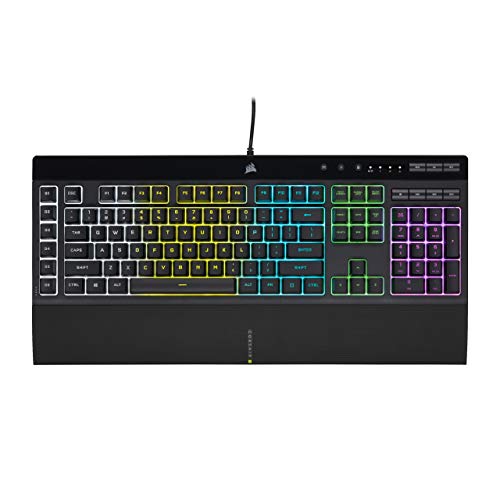
CORSAIR K55 RGB PRO-Dynamic RGB Backlighting – Six Macro Keys with Elgato Stream Deck Software Integration-IP42 Dust and Spill Resistant-Detachable Palm Rest-Dedicated Media and Volume Keys, Black
Brand
Corsair
Series
CORSAIR K55 RGB PRO
Item model number
CH-9226765-NA/FF
Hardware Platform
PC
Item Weight
2.84 pounds
Package Dimensions
20 x 9.8 x 1.85 inches
Color
Black
Manufacturer
Corsair
ASIN
B08Y681W3X
Country of Origin
China
Date First Available
March 30, 2021
Test video – CORSAIR K55 RGB PRO-Dynamic RGB Backlighting – :
Product highlights :
Light up your desktop with six onboard lighting effects, assign a color to each lighting zone, or program your own vibrant lighting effects across five RGB lighting zones with CORSAIR iCUE software.
Activate functions, shortcuts, or keypresses in just one stroke with six dedicated macro keys, easily set up through CORSAIR iCUE software, or use instant streaming commands through Elgato Stream Deck software.
IP42-rated dust and spill resistance guards against accidents so your gameplay never has to stop.
A soft rubber detachable palm rest reduces stress on your hands so you can play longer in comfort, with a textured surface to keep your hands from slipping.
Dedicated volume and media keys let you control media playback and fine-tune volume on-the-fly without having to interrupt your game.
Quiet and responsive keys offer comfortable typing during both work and play, with a tactile bump for responsive gaming performance.
➕ What is the price of CORSAIR K55 RGB PRO-Dynamic RGB Backlighting - in Saudi Arabia ?
The price of CORSAIR K55 RGB PRO-Dynamic RGB Backlighting – in-store is 190 SAR VAT.
➕ When CORSAIR K55 RGB PRO-Dynamic RGB Backlighting - was released ?
The release date was March 30, 2021.
➕ What is the price of CORSAIR K55 RGB PRO-Dynamic RGB Backlighting - cheap used ?
The price of CORSAIR K55 RGB PRO-Dynamic RGB Backlighting – used is 130 SAR VAT.
➕ What are the main characteristics of CORSAIR K55 RGB PRO-Dynamic RGB Backlighting - ?
Special specifications :
Light up your desktop with six onboard lighting effects, assign a color to each lighting zone, or program your own vibrant lighting effects across five RGB lighting zones with CORSAIR iCUE software.
➕ Is it interesting to buy this product ?
The best people who can answer you are customers who have already bought and tested this product (See Customer Reviews). This product is rated 4.7 / 5 on Amazon.
➕ Where to buy CORSAIR K55 RGB PRO-Dynamic RGB Backlighting - in Saudi Arabia ?
Check the duration of the warranty and also the faults and defects it covers. Is it complete or limited? and What is included in the warranty (parts, repairs or both)?
Shipping :
Is delivery offered? And how long does it take to get delivered (Delivery time)
Proof of purchase :
Does the shop give you an invoice ?
After-sales service :
Do they have an after-sales service to have information about the installation or operation (instructions for use). Also in case of problem, it is the seller who takes charge or you must contact the manufacturer or supplier yourself.
_____________________________
16 reviews for CORSAIR K55 RGB PRO-Dynamic RGB Backlighting –
Rated 5 out of 5
N. C (verified owner)–
Fantastic! – I absolutely love this keyboard! I love everything rainbow, so when I came across this keyboard on sale, I showed my boyfriend and he told me that it’s a really good brand and I should get it. So I did (lol). It has so many different light modes, I’ll never get bored of them and I can be creative with the color combos! I keep it on the rainbow wave though, it matches the rainbow wave on my mouse. It makes the click clacks when you type, but it isn’t overly loud. Boyfriend says it’s a membrane keyboard, which means you can’t switch out the key caps but I love it anyway.
Rated 5 out of 5
N. C (verified owner)–
Fantastic! – I absolutely love this keyboard! I love everything rainbow, so when I came across this keyboard on sale, I showed my boyfriend and he told me that it’s a really good brand and I should get it. So I did (lol). It has so many different light modes, I’ll never get bored of them and I can be creative with the color combos! I keep it on the rainbow wave though, it matches the rainbow wave on my mouse. It makes the click clacks when you type, but it isn’t overly loud. Boyfriend says it’s a membrane keyboard, which means you can’t switch out the key caps but I love it anyway.
Rated 5 out of 5
K. G (verified owner)–
Perfect Keyboard for the Price – As the title says, this keyboard is perfect for the price. But don’t let that make you think more money is better here; this keyboard did everything I wanted it to. My biggest problem with my old keyboard is that I couldn’t see it in the dark. I like to use my computer in the dark and the LED fixed that completely for me. Although I am a sucker for LEDs and rainbow-y lighting, I can understand if the light is too distracting; this can be fixed with the brightness key though and even without LED this keyboard is worth the price. The keys feel so good to press and are so silent, at least compared to my old mechanical keyboard. The wrist pad is very nice too and does reduce strain for me, maybe even completely.
Rated 5 out of 5
F. M (verified owner)–
Works with PS5, have to know the secret – I bought this to allow me to do text chat when gaming with my PS5. Not clear at all in the limited instructions, but you have to put it into USB Mode for it to work. To do this you hold down the B and S buttons while you plug your keyboard into the PS5 ( some 10 year old kid posted this on youtube ). If you do not do that the keyboard will not function at all. But if you do that then it’s all good. You can use the macro to record “GGs” to text to your fireteam after a good run, etc.
Rated 5 out of 5
D. K (verified owner)–
Awesome i love this keyboard! – Keys feel nice but the lights turn off randomly. It could the something wrong in ICue but other then that its awesome.
Rated 4 out of 5
O. I (verified owner)–
BIOS Mode – Everything about the keyboard was great except for one small issue that was figured out in time
Rated 4 out of 5
G. P (verified owner)–
Solid keyboard but sloppy “&” – This is a solid gaming keyboard that let’s you customize the background RGB lighting by zones. There are other more advanced keyboards that allow more customization but you pay substantially more for it. For my purposes this was great. It is wired via USB and therefore you never have to worry about batteries or bad wireless connection. The keyboard is very responsive and not too loud when typing. My only dislike is that apparently Corsair decided they wanted to redesign what an ampersand looks like, and the result is this strange symbol instead of the familiar “&”. Picture attached.
Rated 5 out of 5
K. G (verified owner)–
Perfect Keyboard for the Price – As the title says, this keyboard is perfect for the price. But don’t let that make you think more money is better here; this keyboard did everything I wanted it to. My biggest problem with my old keyboard is that I couldn’t see it in the dark. I like to use my computer in the dark and the LED fixed that completely for me. Although I am a sucker for LEDs and rainbow-y lighting, I can understand if the light is too distracting; this can be fixed with the brightness key though and even without LED this keyboard is worth the price. The keys feel so good to press and are so silent, at least compared to my old mechanical keyboard. The wrist pad is very nice too and does reduce strain for me, maybe even completely.
Rated 5 out of 5
D. K (verified owner)–
Awesome i love this keyboard! – Keys feel nice but the lights turn off randomly. It could the something wrong in ICue but other then that its awesome.
Rated 4 out of 5
N. H (verified owner)–
Nice – I enjoy the color and functionality
Rated 5 out of 5
F. M (verified owner)–
Works with PS5, have to know the secret – I bought this to allow me to do text chat when gaming with my PS5. Not clear at all in the limited instructions, but you have to put it into USB Mode for it to work. To do this you hold down the B and S buttons while you plug your keyboard into the PS5 ( some 10 year old kid posted this on youtube ). If you do not do that the keyboard will not function at all. But if you do that then it’s all good. You can use the macro to record “GGs” to text to your fireteam after a good run, etc.
Rated 4 out of 5
G. P (verified owner)–
Solid keyboard but sloppy “&” – This is a solid gaming keyboard that let’s you customize the background RGB lighting by zones. There are other more advanced keyboards that allow more customization but you pay substantially more for it. For my purposes this was great. It is wired via USB and therefore you never have to worry about batteries or bad wireless connection. The keyboard is very responsive and not too loud when typing. My only dislike is that apparently Corsair decided they wanted to redesign what an ampersand looks like, and the result is this strange symbol instead of the familiar “&”. Picture attached.
Rated 4 out of 5
N. H (verified owner)–
Nice – I enjoy the color and functionality
Rated 4 out of 5
O. I (verified owner)–
BIOS Mode – Everything about the keyboard was great except for one small issue that was figured out in time
Rated 5 out of 5
F. L (verified owner)–
Its not far,all my gaming items are from Corsair – its not fair,I barely buy other brands for anything in Gaming, Yes the keyboard works great
Rated 5 out of 5
F. L (verified owner)–
Its not far,all my gaming items are from Corsair – its not fair,I barely buy other brands for anything in Gaming, Yes the keyboard works great



N. C (verified owner) –
Fantastic! – I absolutely love this keyboard! I love everything rainbow, so when I came across this keyboard on sale, I showed my boyfriend and he told me that it’s a really good brand and I should get it. So I did (lol). It has so many different light modes, I’ll never get bored of them and I can be creative with the color combos! I keep it on the rainbow wave though, it matches the rainbow wave on my mouse. It makes the click clacks when you type, but it isn’t overly loud. Boyfriend says it’s a membrane keyboard, which means you can’t switch out the key caps but I love it anyway.
N. C (verified owner) –
Fantastic! – I absolutely love this keyboard! I love everything rainbow, so when I came across this keyboard on sale, I showed my boyfriend and he told me that it’s a really good brand and I should get it. So I did (lol). It has so many different light modes, I’ll never get bored of them and I can be creative with the color combos! I keep it on the rainbow wave though, it matches the rainbow wave on my mouse. It makes the click clacks when you type, but it isn’t overly loud. Boyfriend says it’s a membrane keyboard, which means you can’t switch out the key caps but I love it anyway.
K. G (verified owner) –
Perfect Keyboard for the Price – As the title says, this keyboard is perfect for the price. But don’t let that make you think more money is better here; this keyboard did everything I wanted it to. My biggest problem with my old keyboard is that I couldn’t see it in the dark. I like to use my computer in the dark and the LED fixed that completely for me. Although I am a sucker for LEDs and rainbow-y lighting, I can understand if the light is too distracting; this can be fixed with the brightness key though and even without LED this keyboard is worth the price. The keys feel so good to press and are so silent, at least compared to my old mechanical keyboard. The wrist pad is very nice too and does reduce strain for me, maybe even completely.
F. M (verified owner) –
Works with PS5, have to know the secret – I bought this to allow me to do text chat when gaming with my PS5. Not clear at all in the limited instructions, but you have to put it into USB Mode for it to work. To do this you hold down the B and S buttons while you plug your keyboard into the PS5 ( some 10 year old kid posted this on youtube ). If you do not do that the keyboard will not function at all. But if you do that then it’s all good. You can use the macro to record “GGs” to text to your fireteam after a good run, etc.
D. K (verified owner) –
Awesome i love this keyboard! – Keys feel nice but the lights turn off randomly. It could the something wrong in ICue but other then that its awesome.
O. I (verified owner) –
BIOS Mode – Everything about the keyboard was great except for one small issue that was figured out in time
G. P (verified owner) –
Solid keyboard but sloppy “&” – This is a solid gaming keyboard that let’s you customize the background RGB lighting by zones. There are other more advanced keyboards that allow more customization but you pay substantially more for it. For my purposes this was great. It is wired via USB and therefore you never have to worry about batteries or bad wireless connection. The keyboard is very responsive and not too loud when typing. My only dislike is that apparently Corsair decided they wanted to redesign what an ampersand looks like, and the result is this strange symbol instead of the familiar “&”. Picture attached.
K. G (verified owner) –
Perfect Keyboard for the Price – As the title says, this keyboard is perfect for the price. But don’t let that make you think more money is better here; this keyboard did everything I wanted it to. My biggest problem with my old keyboard is that I couldn’t see it in the dark. I like to use my computer in the dark and the LED fixed that completely for me. Although I am a sucker for LEDs and rainbow-y lighting, I can understand if the light is too distracting; this can be fixed with the brightness key though and even without LED this keyboard is worth the price. The keys feel so good to press and are so silent, at least compared to my old mechanical keyboard. The wrist pad is very nice too and does reduce strain for me, maybe even completely.
D. K (verified owner) –
Awesome i love this keyboard! – Keys feel nice but the lights turn off randomly. It could the something wrong in ICue but other then that its awesome.
N. H (verified owner) –
Nice – I enjoy the color and functionality
F. M (verified owner) –
Works with PS5, have to know the secret – I bought this to allow me to do text chat when gaming with my PS5. Not clear at all in the limited instructions, but you have to put it into USB Mode for it to work. To do this you hold down the B and S buttons while you plug your keyboard into the PS5 ( some 10 year old kid posted this on youtube ). If you do not do that the keyboard will not function at all. But if you do that then it’s all good. You can use the macro to record “GGs” to text to your fireteam after a good run, etc.
G. P (verified owner) –
Solid keyboard but sloppy “&” – This is a solid gaming keyboard that let’s you customize the background RGB lighting by zones. There are other more advanced keyboards that allow more customization but you pay substantially more for it. For my purposes this was great. It is wired via USB and therefore you never have to worry about batteries or bad wireless connection. The keyboard is very responsive and not too loud when typing. My only dislike is that apparently Corsair decided they wanted to redesign what an ampersand looks like, and the result is this strange symbol instead of the familiar “&”. Picture attached.
N. H (verified owner) –
Nice – I enjoy the color and functionality
O. I (verified owner) –
BIOS Mode – Everything about the keyboard was great except for one small issue that was figured out in time
F. L (verified owner) –
Its not far,all my gaming items are from Corsair – its not fair,I barely buy other brands for anything in Gaming, Yes the keyboard works great
F. L (verified owner) –
Its not far,all my gaming items are from Corsair – its not fair,I barely buy other brands for anything in Gaming, Yes the keyboard works great