
Description
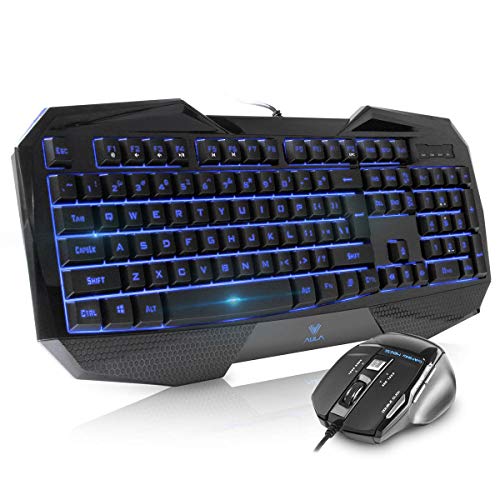
Beastron gaming keyboard and mouse combo,LED 104 – Features & Prices in Saudi Arabia :
Beastron gaming keyboard and mouse combo,LED 104 Keys USB Ergonomic Wrist Rest Computer Keyboard USB Wired for Windows PC Gamers
Brand
Beastron
Series
Crossfire II
Item model number
SI-859 + SI-928
Hardware Platform
PC
Item Weight
2 pounds
Product Dimensions
7 x 24 x 2 inches
Item Dimensions LxWxH
7 x 24 x 2 inches
Color
Crossfire II
Manufacturer
Zettaguard Inc.
ASIN
B01N8X2LQ5
Country of Origin
China
Is Discontinued By Manufacturer
No
Date First Available
November 10, 2016
Test video – Beastron gaming keyboard and mouse combo,LED 104 :
Product highlights :
Questions & Answers – Beastron gaming keyboard and mouse combo,LED 104 :
Technical specifications – Beastron gaming keyboard and mouse combo,LED 104 :
Brand
Beastron
Compatible Devices
Gaming Console
Connectivity Technology
USB
Keyboard Description
Gaming
Special Feature
Lighting, Water Resistant
Color
Crossfire II
Number of Keys
104
Style
SI-859 Gaming Keyboard Mouse Comobo
Item Dimensions LxWxH
7 x 24 x 2 inches
Material
Rubber
Purchase advice :
-
Warranty :
Check the duration of the warranty and also the faults and defects it covers. Is it complete or limited? and What is included in the warranty (parts, repairs or both)?
-
Shipping :
Is delivery offered? And how long does it take to get delivered (Delivery time)
-
Proof of purchase :
Does the shop give you an invoice ?
-
After-sales service :
Do they have an after-sales service to have information about the installation or operation (instructions for use). Also in case of problem, it is the seller who takes charge or you must contact the manufacturer or supplier yourself.
_____________________________
J. E (verified owner) –
Solid choice. Keys are a bit overly “plasticky” (see comments) – For the price this is fantastic. The mouse is nice and responsive and the keyboard is great with the multiple lightning modes, etc. Which, if you’re wondering, you can change the displayed color using FN and 5 on the numpad. I go w purple myself. I only wish the mouse could be done the same with; if it’s possible, I haven’t found out how.
D. Z (verified owner) –
Great product – I didn’t want to spend a ton on a fancy, new keyboard and mouse, that had unnecessary features for casual use. I was kind of obsessed with a backlit keyboard that had a rainbow option, but the solid red is just fine with me. Everything else? Well, it’s a keyboard. It does what you’d expect a keyboard to do, and feels just fine to use. The mouse? Works like a mouse! The forward and back keys on it are kind of easy to press sometimes, but the double click is pretty handy! Only issue I have is that the light refuses to shut off on it, so I have to cover it with my mousepad so that I can sleep. Dunno what caused that issue. Overall, I would definitely recommend this.
G. R (verified owner) –
brighter lights – wish the lighted keyboard was brighter. i have it turned up all the way.
D. H (verified owner) –
Excellent product for the price – I’ve had this gaming keyboard now for over 16 months without a single problem or glitch. I need your help. I recently gave my keyboard to my sister who isn’t computer savvy. I explained the color control functions but she cannot get the commands down.
K. H (verified owner) –
Like – As I read in some reviews the keys seem a bit smaller than my other board from same manufacturer. Tend to miss keys I used to not miss. Not a big problem if I just slow down a bit in typing. I do not game and would have liked if the buttons on mouse were programable as I got used to changing on other mouse for volume adjustment was nice for me. Other than that they work great and I can use keyboard for sound.
D. H (verified owner) –
Excellent product for the price – I’ve had this gaming keyboard now for over 16 months without a single problem or glitch. I need your help. I recently gave my keyboard to my sister who isn’t computer savvy. I explained the color control functions but she cannot get the commands down.
I. Z (verified owner) –
Great product/value – I like the buttons and the fact I can change colors (red, blue, and purple).
J. E (verified owner) –
Solid choice. Keys are a bit overly “plasticky” (see comments) – For the price this is fantastic. The mouse is nice and responsive and the keyboard is great with the multiple lightning modes, etc. Which, if you’re wondering, you can change the displayed color using FN and 5 on the numpad. I go w purple myself. I only wish the mouse could be done the same with; if it’s possible, I haven’t found out how.
I. Z (verified owner) –
Great product/value – I like the buttons and the fact I can change colors (red, blue, and purple).
D. N (verified owner) –
Tanks Amazon, All Junk from China choices – Awful design, small. the wrist pad area is ergonomically AWFUL, its thick and comes nowhere near your wrist, instead it forces you to bend your wrist uncomfortably sharply up and over it then bend your fingers down at a sharp angle to reach the keys. If you DO put your palm on the wrist pad your fingers are over the top of the keyboard causing a un-natural and uncomfortable bend Back towards yourself to reach the keys. If you hunt and peck never putting palm down but this is called a ‘Gaming’ keyboard so you need to be be able to get to W A S D, and this little protrusion sharp an thick only hinders that. So..unusable as Gaming keyboard an pretty much totally unusable for any typing- get yours now!
D. Z (verified owner) –
Great product – I didn’t want to spend a ton on a fancy, new keyboard and mouse, that had unnecessary features for casual use. I was kind of obsessed with a backlit keyboard that had a rainbow option, but the solid red is just fine with me. Everything else? Well, it’s a keyboard. It does what you’d expect a keyboard to do, and feels just fine to use. The mouse? Works like a mouse! The forward and back keys on it are kind of easy to press sometimes, but the double click is pretty handy! Only issue I have is that the light refuses to shut off on it, so I have to cover it with my mousepad so that I can sleep. Dunno what caused that issue. Overall, I would definitely recommend this.
M. M (verified owner) –
Good Quality for Price – The keyboard is lit well, tho at the angle I use it at, on my lap in a recliner, I often have to tip it up to see a key if it is not one I use automatically. At a proper desk angle it is very clear. The keys are relatively quiet, and easy to press, responsive. I have a Dell PC and Windows 10, and I find that some of the keys do not seem to work, like Print Screen, but I may not be using it properly. I am still trying to figure out if it is me or the keyboard. Volume Keys require the use of the FN key at the same time for them to work. As for the MOUSE: well, for gaming it is very quick and responsive and accurate, but when I am just surfing the net, I find it is easy to accidentally set off the BACK and FORWARD keys unintentionally and end up leaving a page you are using. Very sensitive. Other than that I have had not problems. I will update if I figure out the PRINT SCREEN issue.
D. N (verified owner) –
Tanks Amazon, All Junk from China choices – Awful design, small. the wrist pad area is ergonomically AWFUL, its thick and comes nowhere near your wrist, instead it forces you to bend your wrist uncomfortably sharply up and over it then bend your fingers down at a sharp angle to reach the keys. If you DO put your palm on the wrist pad your fingers are over the top of the keyboard causing a un-natural and uncomfortable bend Back towards yourself to reach the keys. If you hunt and peck never putting palm down but this is called a ‘Gaming’ keyboard so you need to be be able to get to W A S D, and this little protrusion sharp an thick only hinders that. So..unusable as Gaming keyboard an pretty much totally unusable for any typing- get yours now!
K. H (verified owner) –
Like – As I read in some reviews the keys seem a bit smaller than my other board from same manufacturer. Tend to miss keys I used to not miss. Not a big problem if I just slow down a bit in typing. I do not game and would have liked if the buttons on mouse were programable as I got used to changing on other mouse for volume adjustment was nice for me. Other than that they work great and I can use keyboard for sound.
G. R (verified owner) –
brighter lights – wish the lighted keyboard was brighter. i have it turned up all the way.
M. M (verified owner) –
Good Quality for Price – The keyboard is lit well, tho at the angle I use it at, on my lap in a recliner, I often have to tip it up to see a key if it is not one I use automatically. At a proper desk angle it is very clear. The keys are relatively quiet, and easy to press, responsive. I have a Dell PC and Windows 10, and I find that some of the keys do not seem to work, like Print Screen, but I may not be using it properly. I am still trying to figure out if it is me or the keyboard. Volume Keys require the use of the FN key at the same time for them to work. As for the MOUSE: well, for gaming it is very quick and responsive and accurate, but when I am just surfing the net, I find it is easy to accidentally set off the BACK and FORWARD keys unintentionally and end up leaving a page you are using. Very sensitive. Other than that I have had not problems. I will update if I figure out the PRINT SCREEN issue.