ASUS ROG Strix Z690-G Gaming WiFi 6E – Features & Prices in Saudi Arabia :
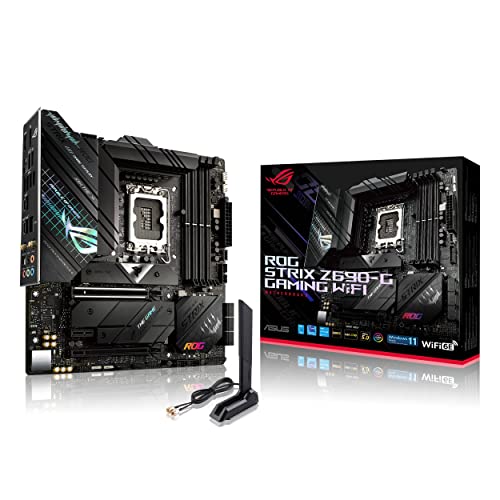
ASUS ROG Strix Z690-G Gaming WiFi 6E LGA 1700(Intel 12th Gen) Micro ATX gaming motherboard(PCIe 5.0,DDR5,14+1 power stages,2.5 Gb LAN,Thunderbolt 4,3xM.2,Front panel USB 3.2 Gen 2×2 Type-C connector)
RAM
DDR5
Memory Speed
2133 MHz
Wireless Type
802.11a/b/g/n, 802.11ax, 801.11ac
Hardware Platform
PC
Item Weight
3.55 pounds
Product Dimensions
12 x 9.6 x 2.2 inches
Item Dimensions LxWxH
12 x 9.6 x 2.2 inches
Manufacturer
Asus
ASIN
B09JRVXRJC
Country of Origin
China
Date First Available
October 27, 2021
Test video – ASUS ROG Strix Z690-G Gaming WiFi 6E :
Product highlights :
Intel LGA 1700 socket: Ready for 12th Gen Intel Core processors, support PCIe 5.0,DDR5 and out of box Windows 11 ready
AI Motherboard : AI Overclocking, AI cooling, AI networking(GameFirst VI) and AI noise cancellation
Robust Power Solution: 14+1 power stages with ProCool II power connector, high-quality alloy chokes and durable capacitors to support multi-core processors
Optimized Thermal Design: VRM heatsink, PCH fanless heatsink, double-sided M.2 heatsink, hybrid fan headers and Fan Xpert 4 utility
High-performance Gaming Networking: On-board WiFi 6E and Intel 2.5 Gb Ethernet with ASUS LANGuard
Best Gaming Connectivity: Supports HDMI 2.0 and DisplayPort 1.4 output, and featuring 3x M.2 and USB 3.2 Gen 2×2 Type-C and Front panel USB 3.2 Gen 2×2 Type-C connectors
Questions & Answers – ASUS ROG Strix Z690-G Gaming WiFi 6E :
➕ What is the price of ASUS ROG Strix Z690-G Gaming WiFi 6E in Saudi Arabia ?
The price of ASUS ROG Strix Z690-G Gaming WiFi 6E in-store is 1210 SAR VAT.
➕ When ASUS ROG Strix Z690-G Gaming WiFi 6E was released ?
The release date was October 27, 2021.
➕ What is the price of ASUS ROG Strix Z690-G Gaming WiFi 6E cheap used ?
The price of ASUS ROG Strix Z690-G Gaming WiFi 6E used is 840 SAR VAT.
➕ What are the main characteristics of ASUS ROG Strix Z690-G Gaming WiFi 6E ?
Special specifications :
Intel LGA 1700 socket: Ready for 12th Gen Intel Core processors, support PCIe 5.0,DDR5 and out of box Windows 11 ready
➕ Is it interesting to buy this product ?
The best people who can answer you are customers who have already bought and tested this product (See Customer Reviews). This product is rated 4.4 / 5 on Amazon.
➕ Where to buy ASUS ROG Strix Z690-G Gaming WiFi 6E in Saudi Arabia ?
Technical specifications – ASUS ROG Strix Z690-G Gaming WiFi 6E :
Brand
ASUS
CPU Socket
LGA 1700
Compatible Devices
Personal Computer
RAM Memory Technology
DDR5
Compatible Processors
12th Generation Intel Core
Chipset Type
Intel Z690
Memory Speed_x005F_x000D_
2133 MHz
Platform
Windows 11
Series
ROG STRIX Z690-G GAMING WIFI
Memory Storage Capacity
128 GB
Purchase advice :
Warranty :
Check the duration of the warranty and also the faults and defects it covers. Is it complete or limited? and What is included in the warranty (parts, repairs or both)?
Shipping :
Is delivery offered? And how long does it take to get delivered (Delivery time)
Proof of purchase :
Does the shop give you an invoice ?
After-sales service :
Do they have an after-sales service to have information about the installation or operation (instructions for use). Also in case of problem, it is the seller who takes charge or you must contact the manufacturer or supplier yourself.
_____________________________
16 reviews for ASUS ROG Strix Z690-G Gaming WiFi 6E
Rated 5 out of 5
D. D (verified owner)–
Excelente – Excelente
Rated 2 out of 5
J. E (verified owner)–
Memory errors out of the box – Memory errors using Corsair CMK32GX5M2B5600C36 DDR5 5600 which is on Asus’s QVL with bios version 0231. Contacted tech support through many chats and emails and it seemed like they did not understand the issues I was having because I had to continually re-explain the problem. I did finally, on my own, went to their website and found a new bios, 1403 that I installed and it seemed to have solved, to some extent, the basic memory problem so I could install Windows 11. When I tried to set the memory speed, in the bios, to 5600, I got back the memory errors. I had to let Asus AI set the memory speed and it would only work at 4800. I got frustrated with tech support and just had them create an RMA and sent the board back to Asus for further testing and or repair.
Rated 5 out of 5
C. K (verified owner)–
They work – My son loved them if you want an upgrade this is the way to go
Rated 5 out of 5
G. F (verified owner)–
Excellent board – Excellent board, best for programming or computer processing applications.
Rated 1 out of 5
J. I (verified owner)–
Numerous unforgivable problems; failed after two months – It was a valiant effort, Asus, but this board has multiple problems. It can be very instructive to go read forum postings in the ROG forum to see what the common problems are, but I’ll outline three big ones.
Rated 4 out of 5
P. K (verified owner)–
Header and Socket Placements Troublesome for Tinkering/Upgrading – Most money I’ve ever spent for a motherboard. Chasis fan 3 header directly next to the CPU socket and hidden under the CPU cooler. With CPU air coolers as large as they are now, the chasis 3 fan header is difficult to access. Same for the M2 slots. Have an RTX 3080 and both are covered by the GPU as well as the 1x PCI. Any tinkering post install is quite difficult. 4x Power Header located which is nearly impossible to get to especially if there are exhaust fans at the top of the case. It is a microATX board; but, layout of pins and headers in some very difficult to reach locations. Definitely not a motherboard for easy upgrades in the future. Tinkering requires disassembly. Also, had an M2 drive die after day 1. Not sure if it’s the socket or the drive. This socket, like those in recent past also extremely fragile, even with caution. Bending pins are extremely easy, even if you’ve built PCs before.
Rated 5 out of 5
R. J (verified owner)–
Premium Board at a Decent Price – Still think it is funny – The Micro designated motherboards are actually larger than the Mini ones? Who thought that one out?
Rated 5 out of 5
Z. O (verified owner)–
Wonderful 12th gen motherboard – Bought this for my first build in an o11 dynamic mini, was a bit of a challenge dealing with a micro atx and small form factor but all in all I’m very pleased with this motherboard
Rated 5 out of 5
C. K (verified owner)–
They work – My son loved them if you want an upgrade this is the way to go
Rated 5 out of 5
D. D (verified owner)–
Excelente – Excelente
Rated 2 out of 5
J. E (verified owner)–
Memory errors out of the box – Memory errors using Corsair CMK32GX5M2B5600C36 DDR5 5600 which is on Asus’s QVL with bios version 0231. Contacted tech support through many chats and emails and it seemed like they did not understand the issues I was having because I had to continually re-explain the problem. I did finally, on my own, went to their website and found a new bios, 1403 that I installed and it seemed to have solved, to some extent, the basic memory problem so I could install Windows 11. When I tried to set the memory speed, in the bios, to 5600, I got back the memory errors. I had to let Asus AI set the memory speed and it would only work at 4800. I got frustrated with tech support and just had them create an RMA and sent the board back to Asus for further testing and or repair.
Rated 1 out of 5
J. I (verified owner)–
Numerous unforgivable problems; failed after two months – It was a valiant effort, Asus, but this board has multiple problems. It can be very instructive to go read forum postings in the ROG forum to see what the common problems are, but I’ll outline three big ones.
Rated 5 out of 5
Z. O (verified owner)–
Wonderful 12th gen motherboard – Bought this for my first build in an o11 dynamic mini, was a bit of a challenge dealing with a micro atx and small form factor but all in all I’m very pleased with this motherboard
Rated 5 out of 5
R. J (verified owner)–
Premium Board at a Decent Price – Still think it is funny – The Micro designated motherboards are actually larger than the Mini ones? Who thought that one out?
Rated 5 out of 5
G. F (verified owner)–
Excellent board – Excellent board, best for programming or computer processing applications.
Rated 4 out of 5
P. K (verified owner)–
Header and Socket Placements Troublesome for Tinkering/Upgrading – Most money I’ve ever spent for a motherboard. Chasis fan 3 header directly next to the CPU socket and hidden under the CPU cooler. With CPU air coolers as large as they are now, the chasis 3 fan header is difficult to access. Same for the M2 slots. Have an RTX 3080 and both are covered by the GPU as well as the 1x PCI. Any tinkering post install is quite difficult. 4x Power Header located which is nearly impossible to get to especially if there are exhaust fans at the top of the case. It is a microATX board; but, layout of pins and headers in some very difficult to reach locations. Definitely not a motherboard for easy upgrades in the future. Tinkering requires disassembly. Also, had an M2 drive die after day 1. Not sure if it’s the socket or the drive. This socket, like those in recent past also extremely fragile, even with caution. Bending pins are extremely easy, even if you’ve built PCs before.


D. D (verified owner) –
Excelente – Excelente
J. E (verified owner) –
Memory errors out of the box – Memory errors using Corsair CMK32GX5M2B5600C36 DDR5 5600 which is on Asus’s QVL with bios version 0231. Contacted tech support through many chats and emails and it seemed like they did not understand the issues I was having because I had to continually re-explain the problem. I did finally, on my own, went to their website and found a new bios, 1403 that I installed and it seemed to have solved, to some extent, the basic memory problem so I could install Windows 11. When I tried to set the memory speed, in the bios, to 5600, I got back the memory errors. I had to let Asus AI set the memory speed and it would only work at 4800. I got frustrated with tech support and just had them create an RMA and sent the board back to Asus for further testing and or repair.
C. K (verified owner) –
They work – My son loved them if you want an upgrade this is the way to go
G. F (verified owner) –
Excellent board – Excellent board, best for programming or computer processing applications.
J. I (verified owner) –
Numerous unforgivable problems; failed after two months – It was a valiant effort, Asus, but this board has multiple problems. It can be very instructive to go read forum postings in the ROG forum to see what the common problems are, but I’ll outline three big ones.
P. K (verified owner) –
Header and Socket Placements Troublesome for Tinkering/Upgrading – Most money I’ve ever spent for a motherboard. Chasis fan 3 header directly next to the CPU socket and hidden under the CPU cooler. With CPU air coolers as large as they are now, the chasis 3 fan header is difficult to access. Same for the M2 slots. Have an RTX 3080 and both are covered by the GPU as well as the 1x PCI. Any tinkering post install is quite difficult. 4x Power Header located which is nearly impossible to get to especially if there are exhaust fans at the top of the case. It is a microATX board; but, layout of pins and headers in some very difficult to reach locations. Definitely not a motherboard for easy upgrades in the future. Tinkering requires disassembly. Also, had an M2 drive die after day 1. Not sure if it’s the socket or the drive. This socket, like those in recent past also extremely fragile, even with caution. Bending pins are extremely easy, even if you’ve built PCs before.
R. J (verified owner) –
Premium Board at a Decent Price – Still think it is funny – The Micro designated motherboards are actually larger than the Mini ones? Who thought that one out?
Z. O (verified owner) –
Wonderful 12th gen motherboard – Bought this for my first build in an o11 dynamic mini, was a bit of a challenge dealing with a micro atx and small form factor but all in all I’m very pleased with this motherboard
C. K (verified owner) –
They work – My son loved them if you want an upgrade this is the way to go
D. D (verified owner) –
Excelente – Excelente
J. E (verified owner) –
Memory errors out of the box – Memory errors using Corsair CMK32GX5M2B5600C36 DDR5 5600 which is on Asus’s QVL with bios version 0231. Contacted tech support through many chats and emails and it seemed like they did not understand the issues I was having because I had to continually re-explain the problem. I did finally, on my own, went to their website and found a new bios, 1403 that I installed and it seemed to have solved, to some extent, the basic memory problem so I could install Windows 11. When I tried to set the memory speed, in the bios, to 5600, I got back the memory errors. I had to let Asus AI set the memory speed and it would only work at 4800. I got frustrated with tech support and just had them create an RMA and sent the board back to Asus for further testing and or repair.
J. I (verified owner) –
Numerous unforgivable problems; failed after two months – It was a valiant effort, Asus, but this board has multiple problems. It can be very instructive to go read forum postings in the ROG forum to see what the common problems are, but I’ll outline three big ones.
Z. O (verified owner) –
Wonderful 12th gen motherboard – Bought this for my first build in an o11 dynamic mini, was a bit of a challenge dealing with a micro atx and small form factor but all in all I’m very pleased with this motherboard
R. J (verified owner) –
Premium Board at a Decent Price – Still think it is funny – The Micro designated motherboards are actually larger than the Mini ones? Who thought that one out?
G. F (verified owner) –
Excellent board – Excellent board, best for programming or computer processing applications.
P. K (verified owner) –
Header and Socket Placements Troublesome for Tinkering/Upgrading – Most money I’ve ever spent for a motherboard. Chasis fan 3 header directly next to the CPU socket and hidden under the CPU cooler. With CPU air coolers as large as they are now, the chasis 3 fan header is difficult to access. Same for the M2 slots. Have an RTX 3080 and both are covered by the GPU as well as the 1x PCI. Any tinkering post install is quite difficult. 4x Power Header located which is nearly impossible to get to especially if there are exhaust fans at the top of the case. It is a microATX board; but, layout of pins and headers in some very difficult to reach locations. Definitely not a motherboard for easy upgrades in the future. Tinkering requires disassembly. Also, had an M2 drive die after day 1. Not sure if it’s the socket or the drive. This socket, like those in recent past also extremely fragile, even with caution. Bending pins are extremely easy, even if you’ve built PCs before.