Test video – ASUS Optical Gaming Mouse – ROG Chakram :
Product highlights :
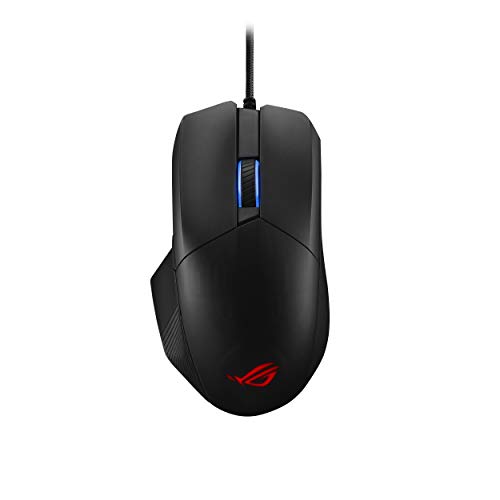
VERSATILE GAMING MOUSE – The ROG Chakram Core is a 16,000 dpi, 1000 Hz wired gaming mouse with a programmable, removable joystick to put superior control right under your thumb. Featuring exclusive push-fit switch sockets, adjustable weight, and the unique DPI On-The-Scroll feature for sensitivity adjustment, Chakram Core puts everything you need right in your hand.
OPTICAL GAMING MICE – ROG Chakram Core is equipped with a high-end optical sensor to give you the speed and accuracy needed for victory. Its 100 to 16,000 dpi sensor is among the best in class that tracks movements up to an astounding 400 inches per second (IPS) at up to 40 g acceleration. Its 1,000 Hz polling rate ensures lag-free responsiveness so the onscreen action reacts instantly.
CERTIFIED NVIDIA RLA – The ROG Chakram Core is one of the first gaming mice officially verified for NVIDIA Reflex Latency Analyzer (RLA). It lets you monitor the performance of your mouse in real-time for optimal performance.
PIVOTED BUTTONS, RAPID SPEED – Shorter travel means quicker clicks, which is why ROG engineers equipped ROG Chakram Core with pivoted buttons. The mechanism utilizes springs and metal hinges to balance the keys and minimize the distance between the buttons and switches. The upshot is minimal travel and rapid return, ensuring superb speed, responsiveness and consistency with every click.
CUSTOMIZE YOUR DPI – Tapping the DPI mice button lets you cycle between 4 levels of sensitivity instantly. The DPI On-The-Scroll feature on ROG Chakram Core lets you adjust mouse sensitivity easily, with no software required. Just press and hold the DPI button and scroll the wheel to select sensitivity levels for more accurate sniping or raise it for faster scrolling across the screen. The lights on Chakram Core mouse even change to indicate current DPI levels. Press the DPI button again to lock the sensitivity.
➕ What is the price of ASUS Optical Gaming Mouse - ROG Chakram in Saudi Arabia ?
The price of ASUS Optical Gaming Mouse – ROG Chakram in-store is 190 SAR VAT.
➕ When ASUS Optical Gaming Mouse - ROG Chakram was released ?
The release date was September 29, 2020.
➕ What is the price of ASUS Optical Gaming Mouse - ROG Chakram cheap used ?
The price of ASUS Optical Gaming Mouse – ROG Chakram used is 130 SAR VAT.
➕ What are the main characteristics of ASUS Optical Gaming Mouse - ROG Chakram ?
Special specifications :
VERSATILE GAMING MOUSE – The ROG Chakram Core is a 16,000 dpi, 1000 Hz wired gaming mouse with a programmable, removable joystick to put superior control right under your thumb. Featuring exclusive push-fit switch sockets, adjustable weight, and the unique DPI On-The-Scroll feature for sensitivity adjustment, Chakram Core puts everything you need right in your hand.
➕ Is it interesting to buy this product ?
The best people who can answer you are customers who have already bought and tested this product (See Customer Reviews). This product is rated 4.3 / 5 on Amazon.
➕ Where to buy ASUS Optical Gaming Mouse - ROG Chakram in Saudi Arabia ?
Check the duration of the warranty and also the faults and defects it covers. Is it complete or limited? and What is included in the warranty (parts, repairs or both)?
Shipping :
Is delivery offered? And how long does it take to get delivered (Delivery time)
Proof of purchase :
Does the shop give you an invoice ?
After-sales service :
Do they have an after-sales service to have information about the installation or operation (instructions for use). Also in case of problem, it is the seller who takes charge or you must contact the manufacturer or supplier yourself.
_____________________________
10 reviews for ASUS Optical Gaming Mouse – ROG Chakram
Rated 5 out of 5
J. A (verified owner)–
Do it! – Was skeptical at first, I’m coming from a Logitech G400 mouse that’s served me well for the last 7-8 years in CS:GO. The low latency click brought me here, want the best advantage while playing. Size comparison its about the same as the logitech and the mouse wheel is in a better spot. Does have DPI button but is at the bottom you can’t quickly change DPI in the middle of the round without lifting the mouse. (If you’re a sniper and used to change DPI on the fly then its a lot harder/On the other hand if you’re the kind that accidentally presses the DPI button on the Logitech you cannot accidentally change it on this Rog Chackram Core.
Rated 4 out of 5
A. H (verified owner)–
Good feature and relatively comfortable. – I like the feature that you can replace the microswitches for the left and right button. My previous mouse that this one replace has exhibited ‘double click’ after only about a year. The mouse was not even used during the day as routine work mouse. This is one of my main reason to give ROG Chakrum a try. I also did not realize before that you can get different click feels or property with different brands of microswitch. That is also a fun part.
Rated 5 out of 5
K. K (verified owner)–
Best gaming mouse and have ever used – This is hands down the best gaming mouse I have ever used in my 20 years of gaming. I’ve had nearly every other brands flagship mouse in that time span and this one beats all of them. I personally have the wireless version for myself and got this one for my girlfriend who does light gaming. The joystick can be mapped to other buttons or macros. It comes with spare switches that have different resistances, they are incredibly easy to swap out and it is just an added sense of relief should a switch start to go out or have double click issues. The one I’ve been using heavily for FPS games and MMOs for the last year and a half, has not had any issues. Would recommend this mouse to anyone and I like that they offer a wired version at a much cheaper price point. 10/10
Rated 4 out of 5
G. C (verified owner)–
Lightweight, and Fast, but software is very bloated – I did some research on a few mice before settling on this (Asus ROG Chackram Core). I’ve been gaming since the early 2000s, and tend to be a bit picky with my mice. I’m an average FPS player (maybe a bit above average on certain games), but not a pro or anything like that. But a good mouse can make a difference. Some reviewers of mice have shown this mouse has a very good and accurate/consistent sensor, and very low latency, so that’s a plus.
Rated 5 out of 5
K. K (verified owner)–
Best gaming mouse and have ever used – This is hands down the best gaming mouse I have ever used in my 20 years of gaming. I’ve had nearly every other brands flagship mouse in that time span and this one beats all of them. I personally have the wireless version for myself and got this one for my girlfriend who does light gaming. The joystick can be mapped to other buttons or macros. It comes with spare switches that have different resistances, they are incredibly easy to swap out and it is just an added sense of relief should a switch start to go out or have double click issues. The one I’ve been using heavily for FPS games and MMOs for the last year and a half, has not had any issues. Would recommend this mouse to anyone and I like that they offer a wired version at a much cheaper price point. 10/10
Rated 4 out of 5
A. H (verified owner)–
Good feature and relatively comfortable. – I like the feature that you can replace the microswitches for the left and right button. My previous mouse that this one replace has exhibited ‘double click’ after only about a year. The mouse was not even used during the day as routine work mouse. This is one of my main reason to give ROG Chakrum a try. I also did not realize before that you can get different click feels or property with different brands of microswitch. That is also a fun part.
Rated 4 out of 5
D. L (verified owner)–
A awesome accessibility/gimmick device – Firstly for anyone that wants to play games and wanted to be able to move/look and even fully play some games fully one handed, this is an amazing device, and if you dont want to use the joystick as one, it doubles as 4 extra buttons to program keybinds too. unfortunatley the joystick is a tad too far forwards but feels well made, and the software is a pain to use and very much needs some tweaking (quite buggy in my experience, I’m having issues with the main 2 programmable buttons stopping/starting working randomly with certain commands programmed to them like macros and stealth modes) but all in all, an awesome mouse that I feel I’ll be using for a long time to come
Rated 5 out of 5
J. A (verified owner)–
Do it! – Was skeptical at first, I’m coming from a Logitech G400 mouse that’s served me well for the last 7-8 years in CS:GO. The low latency click brought me here, want the best advantage while playing. Size comparison its about the same as the logitech and the mouse wheel is in a better spot. Does have DPI button but is at the bottom you can’t quickly change DPI in the middle of the round without lifting the mouse. (If you’re a sniper and used to change DPI on the fly then its a lot harder/On the other hand if you’re the kind that accidentally presses the DPI button on the Logitech you cannot accidentally change it on this Rog Chackram Core.
Rated 4 out of 5
D. L (verified owner)–
A awesome accessibility/gimmick device – Firstly for anyone that wants to play games and wanted to be able to move/look and even fully play some games fully one handed, this is an amazing device, and if you dont want to use the joystick as one, it doubles as 4 extra buttons to program keybinds too. unfortunatley the joystick is a tad too far forwards but feels well made, and the software is a pain to use and very much needs some tweaking (quite buggy in my experience, I’m having issues with the main 2 programmable buttons stopping/starting working randomly with certain commands programmed to them like macros and stealth modes) but all in all, an awesome mouse that I feel I’ll be using for a long time to come
Rated 4 out of 5
G. C (verified owner)–
Lightweight, and Fast, but software is very bloated – I did some research on a few mice before settling on this (Asus ROG Chackram Core). I’ve been gaming since the early 2000s, and tend to be a bit picky with my mice. I’m an average FPS player (maybe a bit above average on certain games), but not a pro or anything like that. But a good mouse can make a difference. Some reviewers of mice have shown this mouse has a very good and accurate/consistent sensor, and very low latency, so that’s a plus.


J. A (verified owner) –
Do it! – Was skeptical at first, I’m coming from a Logitech G400 mouse that’s served me well for the last 7-8 years in CS:GO. The low latency click brought me here, want the best advantage while playing. Size comparison its about the same as the logitech and the mouse wheel is in a better spot. Does have DPI button but is at the bottom you can’t quickly change DPI in the middle of the round without lifting the mouse. (If you’re a sniper and used to change DPI on the fly then its a lot harder/On the other hand if you’re the kind that accidentally presses the DPI button on the Logitech you cannot accidentally change it on this Rog Chackram Core.
A. H (verified owner) –
Good feature and relatively comfortable. – I like the feature that you can replace the microswitches for the left and right button. My previous mouse that this one replace has exhibited ‘double click’ after only about a year. The mouse was not even used during the day as routine work mouse. This is one of my main reason to give ROG Chakrum a try. I also did not realize before that you can get different click feels or property with different brands of microswitch. That is also a fun part.
K. K (verified owner) –
Best gaming mouse and have ever used – This is hands down the best gaming mouse I have ever used in my 20 years of gaming. I’ve had nearly every other brands flagship mouse in that time span and this one beats all of them. I personally have the wireless version for myself and got this one for my girlfriend who does light gaming. The joystick can be mapped to other buttons or macros. It comes with spare switches that have different resistances, they are incredibly easy to swap out and it is just an added sense of relief should a switch start to go out or have double click issues. The one I’ve been using heavily for FPS games and MMOs for the last year and a half, has not had any issues. Would recommend this mouse to anyone and I like that they offer a wired version at a much cheaper price point. 10/10
G. C (verified owner) –
Lightweight, and Fast, but software is very bloated – I did some research on a few mice before settling on this (Asus ROG Chackram Core). I’ve been gaming since the early 2000s, and tend to be a bit picky with my mice. I’m an average FPS player (maybe a bit above average on certain games), but not a pro or anything like that. But a good mouse can make a difference. Some reviewers of mice have shown this mouse has a very good and accurate/consistent sensor, and very low latency, so that’s a plus.
K. K (verified owner) –
Best gaming mouse and have ever used – This is hands down the best gaming mouse I have ever used in my 20 years of gaming. I’ve had nearly every other brands flagship mouse in that time span and this one beats all of them. I personally have the wireless version for myself and got this one for my girlfriend who does light gaming. The joystick can be mapped to other buttons or macros. It comes with spare switches that have different resistances, they are incredibly easy to swap out and it is just an added sense of relief should a switch start to go out or have double click issues. The one I’ve been using heavily for FPS games and MMOs for the last year and a half, has not had any issues. Would recommend this mouse to anyone and I like that they offer a wired version at a much cheaper price point. 10/10
A. H (verified owner) –
Good feature and relatively comfortable. – I like the feature that you can replace the microswitches for the left and right button. My previous mouse that this one replace has exhibited ‘double click’ after only about a year. The mouse was not even used during the day as routine work mouse. This is one of my main reason to give ROG Chakrum a try. I also did not realize before that you can get different click feels or property with different brands of microswitch. That is also a fun part.
D. L (verified owner) –
A awesome accessibility/gimmick device – Firstly for anyone that wants to play games and wanted to be able to move/look and even fully play some games fully one handed, this is an amazing device, and if you dont want to use the joystick as one, it doubles as 4 extra buttons to program keybinds too. unfortunatley the joystick is a tad too far forwards but feels well made, and the software is a pain to use and very much needs some tweaking (quite buggy in my experience, I’m having issues with the main 2 programmable buttons stopping/starting working randomly with certain commands programmed to them like macros and stealth modes) but all in all, an awesome mouse that I feel I’ll be using for a long time to come
J. A (verified owner) –
Do it! – Was skeptical at first, I’m coming from a Logitech G400 mouse that’s served me well for the last 7-8 years in CS:GO. The low latency click brought me here, want the best advantage while playing. Size comparison its about the same as the logitech and the mouse wheel is in a better spot. Does have DPI button but is at the bottom you can’t quickly change DPI in the middle of the round without lifting the mouse. (If you’re a sniper and used to change DPI on the fly then its a lot harder/On the other hand if you’re the kind that accidentally presses the DPI button on the Logitech you cannot accidentally change it on this Rog Chackram Core.
D. L (verified owner) –
A awesome accessibility/gimmick device – Firstly for anyone that wants to play games and wanted to be able to move/look and even fully play some games fully one handed, this is an amazing device, and if you dont want to use the joystick as one, it doubles as 4 extra buttons to program keybinds too. unfortunatley the joystick is a tad too far forwards but feels well made, and the software is a pain to use and very much needs some tweaking (quite buggy in my experience, I’m having issues with the main 2 programmable buttons stopping/starting working randomly with certain commands programmed to them like macros and stealth modes) but all in all, an awesome mouse that I feel I’ll be using for a long time to come
G. C (verified owner) –
Lightweight, and Fast, but software is very bloated – I did some research on a few mice before settling on this (Asus ROG Chackram Core). I’ve been gaming since the early 2000s, and tend to be a bit picky with my mice. I’m an average FPS player (maybe a bit above average on certain games), but not a pro or anything like that. But a good mouse can make a difference. Some reviewers of mice have shown this mouse has a very good and accurate/consistent sensor, and very low latency, so that’s a plus.